
Google Signed-In Bots
A signed-in bot joins Google Meet as a real Google Workspace user, so it can join meetings that require a Google account and skip the lobby when it is on the calendar invite.
This guide applies to Google Meet only. For Microsoft Teams, see Microsoft Teams Signed-In Bots. For how guest bots join, see Google Meet Bots.
When to use a signed-in bot
Signed-in bots can’t bypass a policy that only admits people from the organizer’s own organization, unless the bot account belongs to that organization.
How it works
You create a small, dedicated Google Workspace that holds only bot accounts, and point its single sign-on (SSO) at MeetStream. MeetStream then acts as the SAML identity provider (IdP) for that Workspace: when a bot signs in with one of your bot accounts, Google hands the sign-in to MeetStream, and MeetStream answers with a response signed by the private key you uploaded. No passwords are stored or typed.
MeetStream only completes sign-ins for bots it launched with a registered login. Anyone else sent to the sign-in URL is refused.
Use a Workspace that contains only bot accounts. Google’s legacy SSO profile applies to every user in the Workspace except the org units or groups you exempt, and MeetStream only signs in bot logins, so regular users in that Workspace could no longer sign in. Your company’s main Workspace should not be used.
Before you start
- A Google Workspace for a domain you use only for bot accounts. This guide uses
example.com. - A super administrator for that Workspace who is not one of the bot accounts. Google does not send super administrators to the third-party IdP when they sign in at
admin.google.com, so this account keeps working after SSO is on (Google: super administrator SSO). - One or more regular (non-admin) user accounts for the bots, for example
notetaker@example.com. Give each the name and photo you want Meet to show. - OpenSSL on your machine, to create the signing key and certificate.
- A MeetStream API key and access to the MeetStream dashboard.
Part 1: Set up Google Workspace
Create the bot accounts
In the Google Admin console of your bot Workspace, add a user for each bot login. The account’s first and last name become the name shown in Meet, and its profile photo becomes the bot’s avatar.
Plan one account per 30 bots you expect to run at the same time (see How many logins you need).
Generate a signing key and certificate
Run this once. It creates a private key (key.pem) and a self-signed certificate (cert.pem) valid for 10 years:
cert.pemgoes to Google (Part 1, step 5) and to MeetStream (Part 2, step 3).key.pemgoes only to MeetStream. Keep it private.
Use this same pair for every bot account in the domain: Google checks every sign-in against the one certificate in your SSO profile.
Open the SSO settings
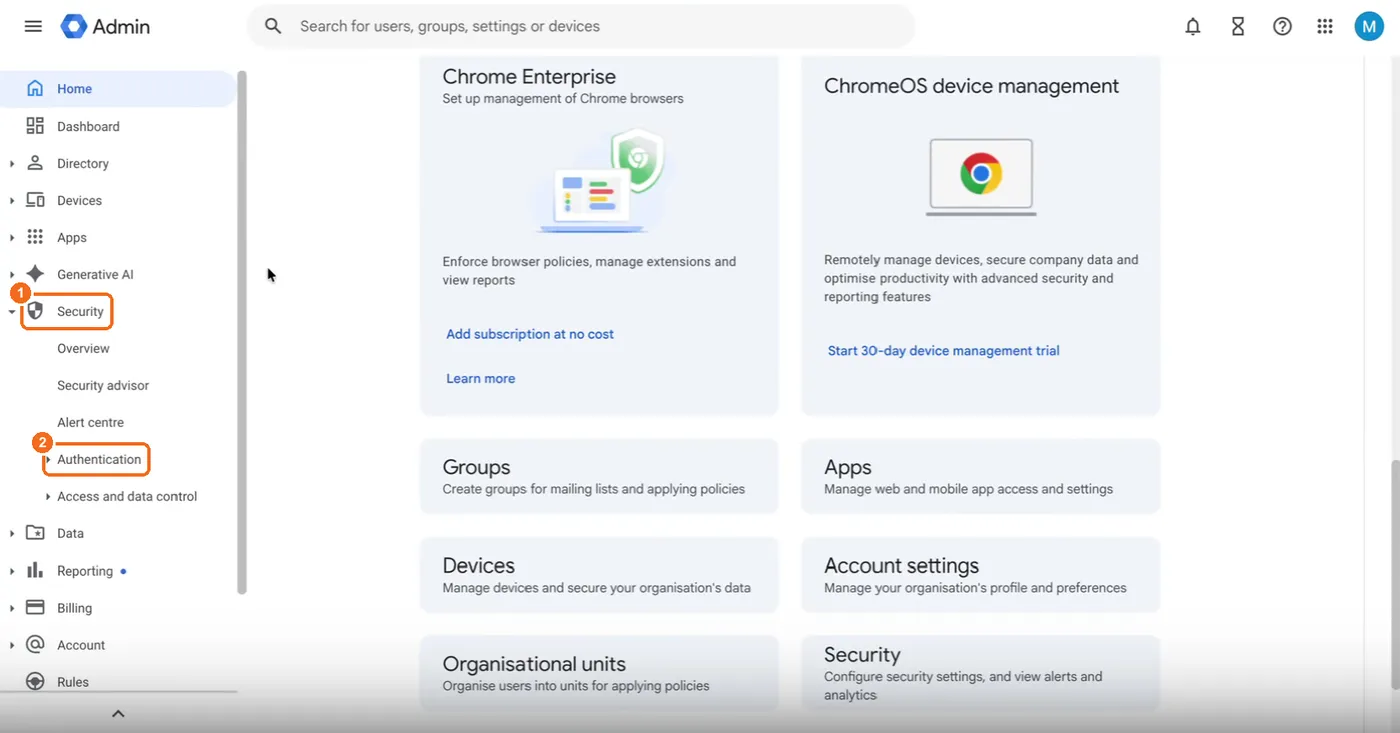
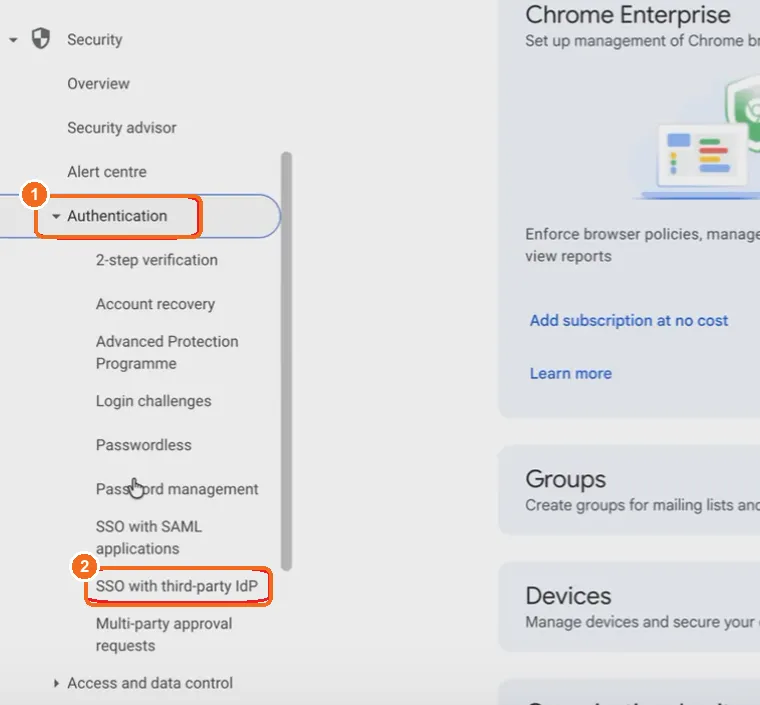
Sign in to admin.google.com as the super administrator. Go to Security > Authentication > SSO with third party IdP.
Open the legacy SSO profile
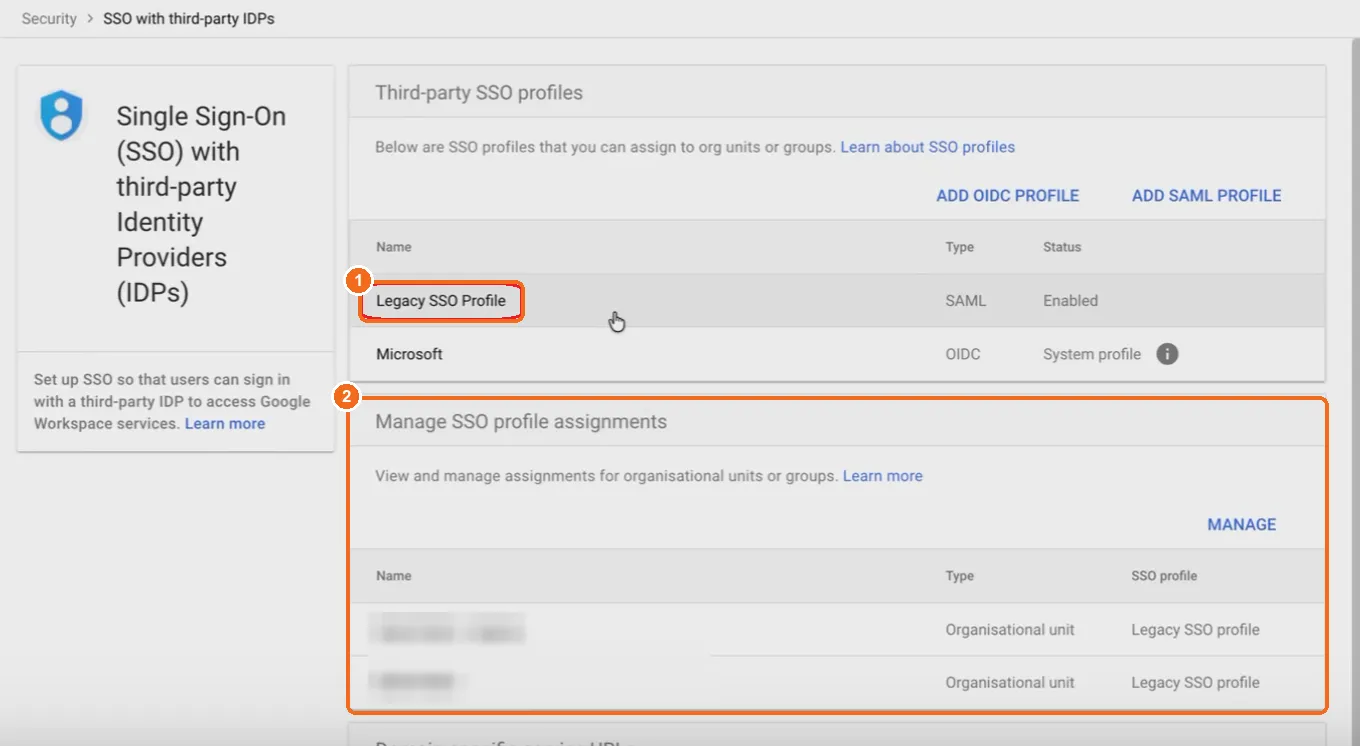
Under Third-party SSO profiles, click Legacy SSO Profile if it is listed. If it is not, click Add SAML profile, then at the bottom of the IdP details page click Go to legacy SSO profile settings (Google: set up SSO).
MeetStream supports the legacy SSO profile. Google’s console recommends newer SSO profiles; MeetStream sign-in is documented and tested with the legacy profile only.
Point the profile at MeetStream
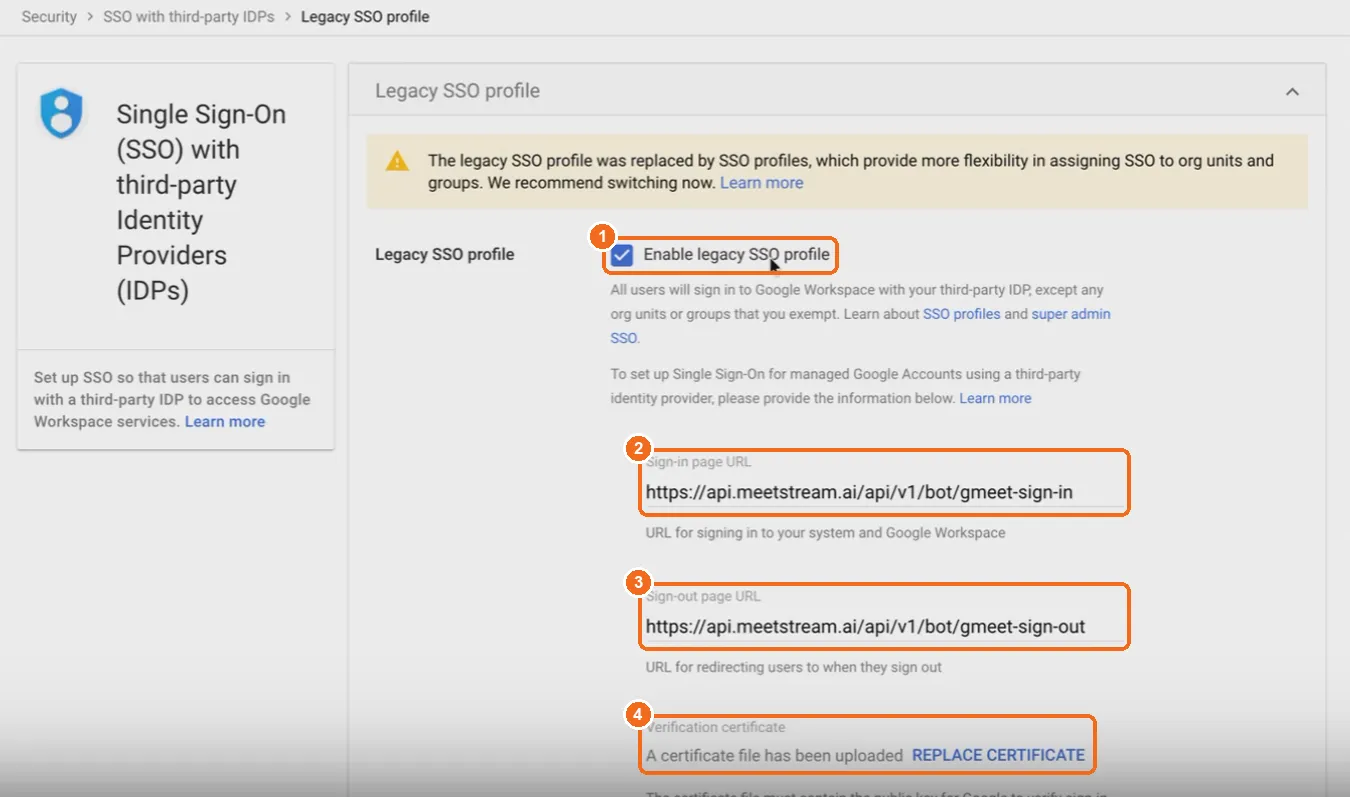
On the Legacy SSO profile page:
- Check Enable legacy SSO profile. (Google’s help calls this box Enable SSO with third-party identity provider.)
- Sign-in page URL:
- Sign-out page URL (Google requires a value):
- Verification certificate: upload
cert.pem. - Check Use a domain-specific issuer. Google then identifies your domain in every sign-in request (as
google.com/a/<your-domain>), which MeetStream uses to match the request to your logins. - Click Save.
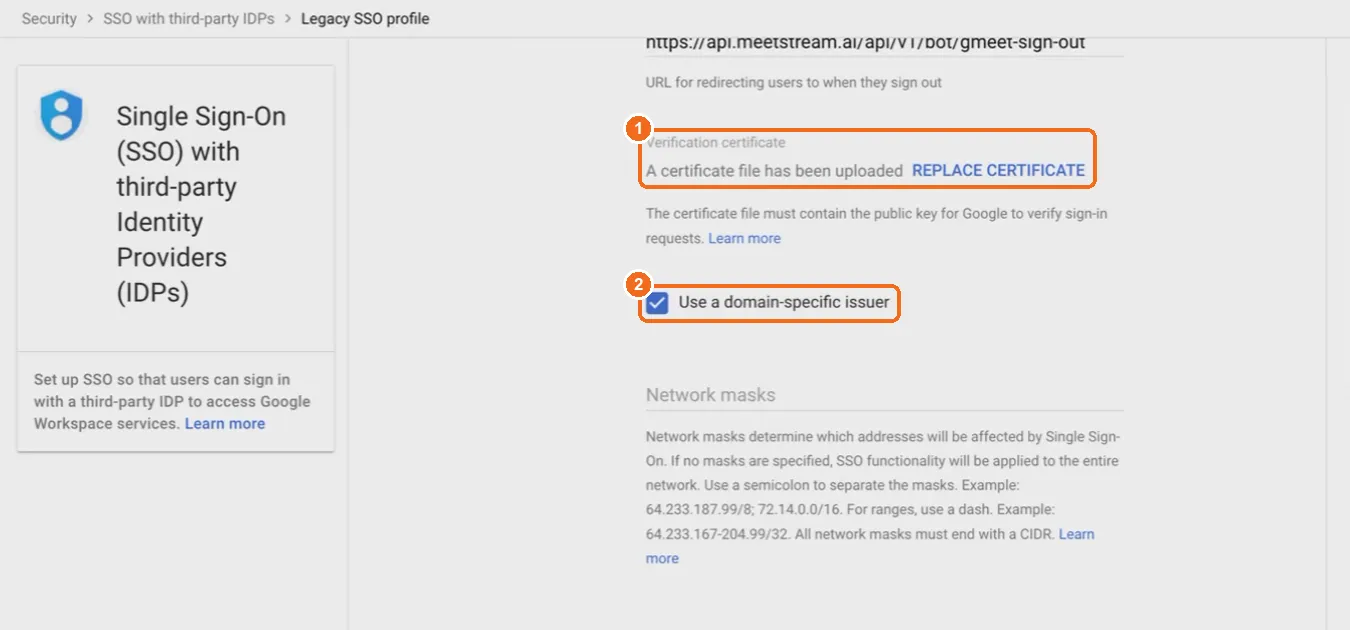
Assign the profile to the bot accounts
Back on SSO with third party IdP, click Manage SSO profile assignments, then Get started (first time) or Manage assignments. Select the organizational unit or group that contains the bot accounts and assign the Legacy SSO profile to it. Click Save.
In a Workspace that only holds bots, assigning it to the top-level organizational unit is simplest. Google may take a little while to apply the change.
Part 2: Register the domain and logins in MeetStream
Open Signed Bots
In the MeetStream dashboard, go to Integrations > Signed Bots and click Add domain.
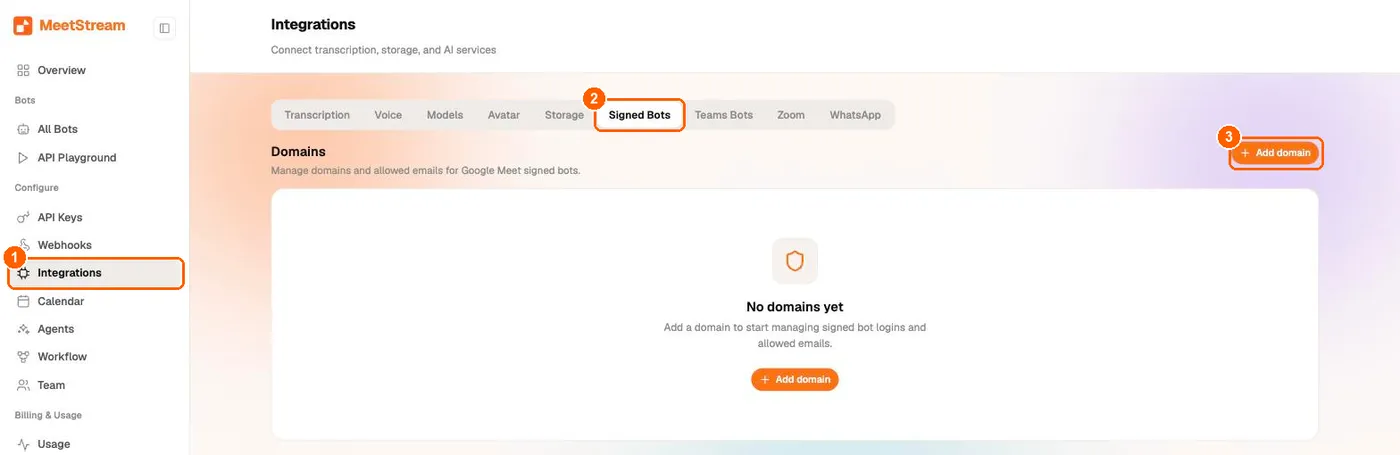
Add your bot domain
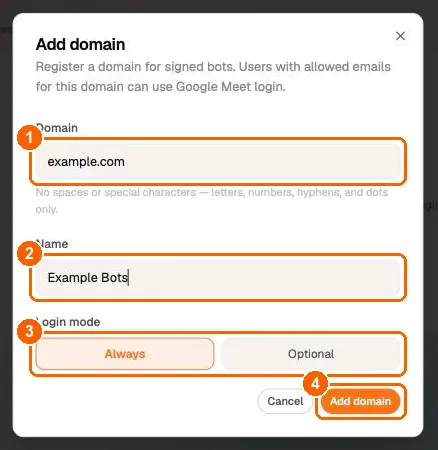
- Domain (1): the bot Workspace domain, exactly as it appears after the
@in the bot emails, in lowercase (for exampleexample.com). You will send the same value asgoogle_login_domain. - Name (2): any label you like.
- Login mode (3): leave Always. See Login mode.
- Click Add domain (4).
A domain can be registered by one MeetStream account only. Registering it again returns HTTP 409 Domain <domain> already registered.
Add each bot account and upload the key pair
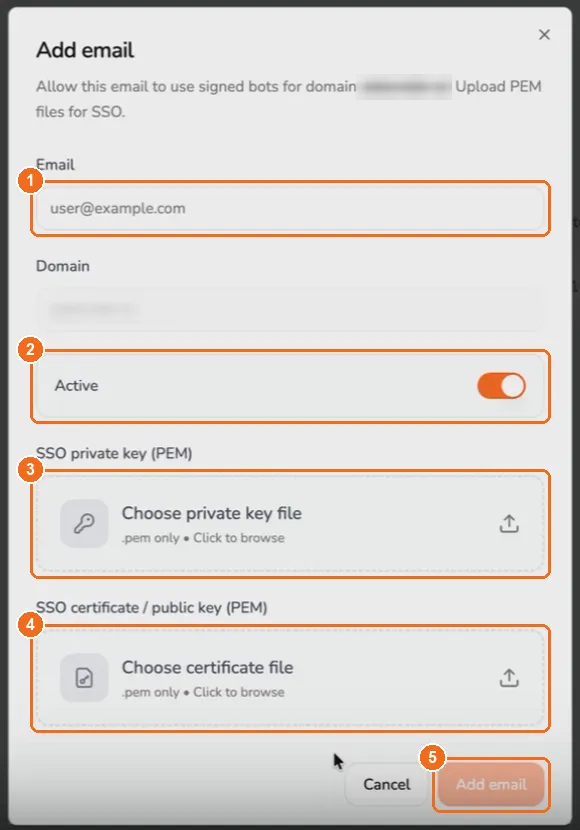
Open the domain (click its row or View), then click Add email. For every bot account:
- Email: the bot account, for example
notetaker@example.com. - Active: leave on. Only active logins are used.
- SSO private key (PEM): upload
key.pem. - SSO certificate / public key (PEM): upload
cert.pem. - Click Add email.
Upload the same key.pem and cert.pem for every email in the domain.
Or use the API
The same setup is available with your API key (Google Signed-In Bots endpoints):
Part 3: Send a signed-in bot
Add a google_meet block to Create Bot:
Request fields
The google_meet block is only accepted for Google Meet links. With a signed-in bot, bot_name is not shown in Meet (the Google account’s name is), but bot_image_url is still used as the bot’s camera image.
How MeetStream picks a login
- Only logins marked Active are candidates.
- If you set
sign_in_email, that login is used when it has room. Otherwise the request fails (strict_email: true) or falls back to step 3 (strict_email: false). - Otherwise MeetStream picks the login with the fewest bots currently joining or in a meeting.
- Each login carries up to 30 bots at the same time.
For scheduled bots, the login is picked when the bot is about to join, not when you schedule it.
How many logins you need
30 is the hard ceiling per login, so add headroom. Planning on 20 bots per login leaves room for spikes. For example, a peak of 100 concurrent signed-in bots needs at least 4 logins; 5 is safer.
Errors when creating the bot
Errors return a JSON body of the form {"message": "..."}.
A 429 here means “no login is free right now”. Retry after bots finish, add logins, or drop strict_email.
If sign-in fails, the bot does not join as a guest
A signed-in bot never falls back to guest mode. If Google sign-in does not complete, the bot stops before opening the meeting:
See Troubleshooting for what to check.
What participants see
- The Google account’s name and photo. Change them on the account in Google Admin.
- The bot’s camera tile shows your
bot_image_url. - Status webhooks for signed-in bots include
profile_image_url(the account’s photo) when available.
Skip the lobby with the calendar invite
Add the bot account’s exact email as a guest on the Google Calendar event, and send the bot with sign_in_email set to that address (keep strict_email: true). Meet then treats the bot as an invited participant:
- Open and Trusted or Restricted meetings: the invited bot joins directly.
- Waiting room on: the bot waits like everyone else until a host brings it in.
The full admission matrix is on the Google Meet page.
Login mode
The Login mode on a domain (Always or Optional in the dashboard, always or if_required in the API) is saved with the domain but does not change Google Meet bots today. A bot signs in exactly when its request sets google_meet.login_required: true, and joins as a guest otherwise. Choose Always.
Troubleshooting
My bot failed with GoogleSignInFailed. What should I check?
Work through this list:
- The email exists as a user in the bot Workspace and is not suspended.
- The user is in the org unit or group that has the Legacy SSO profile assigned.
- The user is not a super administrator. In the normal sign-in flow, Google does not send super administrators to a third-party IdP.
- The certificate in Google Admin matches the
cert.pemuploaded for that email in MeetStream, and thekey.pembelongs to the same pair. - The Sign-in page URL is exactly
https://api.meetstream.ai/api/v1/bot/gmeet-sign-in. - Use a domain-specific issuer is checked.
- The login is Active in MeetStream, and the domain registered in MeetStream matches the email’s domain.
Create Bot returns 400: google_login_domain is not registered
Register the domain under Integrations > Signed Bots (or POST /api/v1/google-login-domains) with the same API account you use to create bots. Use the domain in lowercase in both places.
Create Bot returns 403: not registered to this account
The domain belongs to another MeetStream account. Create bots with an API key from the account that registered the domain.
Create Bot returns 429
No login could take the bot: none are active, the sign_in_email login is missing or full (with strict_email: true), or all logins already carry 30 bots. Add logins, activate them, or set strict_email: false.
My signed-in bot is invited but still waits in the lobby
Check that the invited email is exactly the login the bot used (pin it with sign_in_email), and that the event does not have the Waiting room turned on. For recurring events, check that the specific occurrence still lists the bot as a guest.
The bot shows the wrong name or photo
Signed-in bots always show the Google account’s profile. Update the user’s name or photo in Google Admin; bot_name does not apply.
Can signed-in bots join meetings hosted by other companies?
Yes, as an external participant, as long as the host’s organization lets external Google accounts join. It skips the lobby only when its email is on that meeting’s invite and the meeting is not using a Waiting room.
How do I rotate the certificate?
Generate a new key pair, upload the new cert.pem in the Legacy SSO profile (Replace certificate), then update every login in MeetStream with the new key.pem and cert.pem (remove and re-add the email in the dashboard, or PATCH /api/v1/google-logins/{login_id}). Do this when no signed-in bots are running, because sign-ins fail while Google and MeetStream hold different certificates.
Related
- Google Meet Bots: join flow, admission rules, statuses and media on Meet
- Google Meet Lobby & Admission Troubleshooting
- Bot status and error code reference
- Webhooks and Events
- Automatic Leave Configurations