
Workspace Webhook Endpoints
Register an HTTPS endpoint once in the dashboard and MeetStream delivers signed events for every bot in your workspace, with no per-request wiring.
Workspace endpoints or per-bot callback_url?
There are two ways to receive the same events. Payloads are identical; what differs is signing and filtering.
If a bot’s callback_url is the same URL as an active workspace endpoint that subscribes to the event, MeetStream delivers the event once, signed. custom_attributes you set on the bot are included in the events either way, so you can route by customer or job in your own code.
Create an endpoint
Open Webhooks
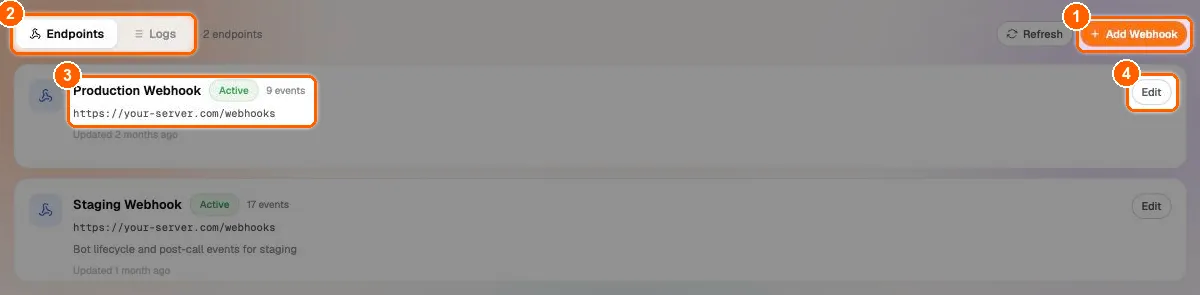
In the sidebar, under Configure, click Webhooks. The page (“Receive real-time events from your bots”) has two tabs: Endpoints and Logs (2). Each endpoint card shows its name, Active or Disabled, the number of subscribed events and the URL (3); Edit (4) changes it. Click Add Webhook (1).
Name the endpoint and enter its URL
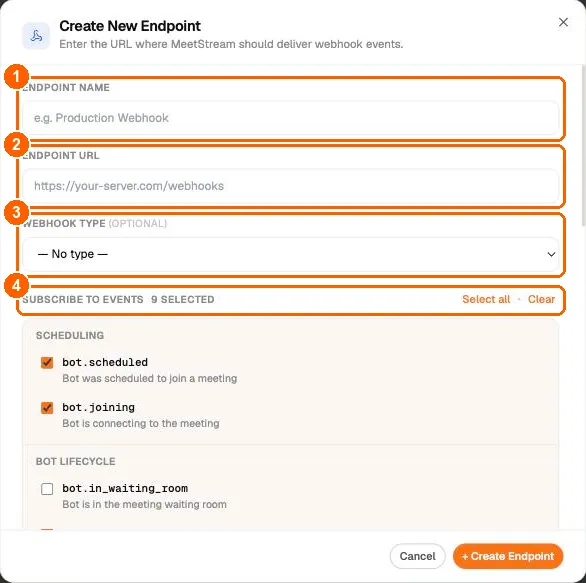
In Create New Endpoint, fill in:
- Endpoint name (1), for example “Production Webhook”.
- Endpoint URL (2): a publicly reachable HTTPS URL on your server.
- Webhook type (optional) (3):
transcription_webhookorerror_webhook. This is a label that shows with the endpoint and its deliveries. It does not change which events are sent. - Subscribe to events (4): the counter shows how many events are selected. Select all and Clear change them all at once. You must pick at least one event.
Choose events
Events are grouped exactly as below. A new endpoint starts with 9 events selected: bot.scheduled, bot.joining, bot.inmeeting, bot.stopped, bot.failed, audio.processed, transcription.processed, video.processed and bot.done.
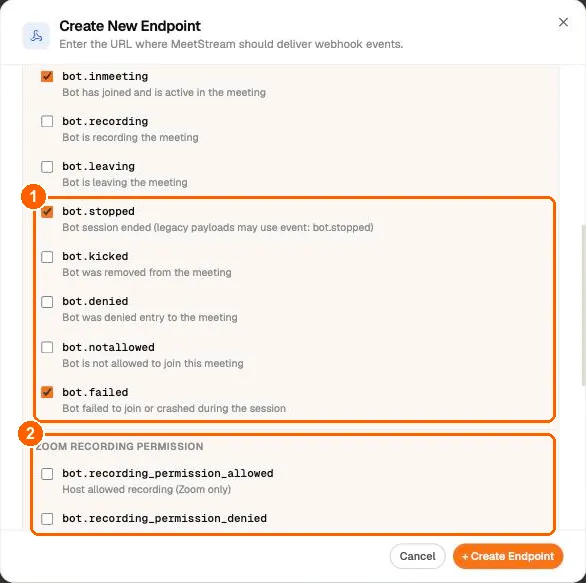
Subscribe to all five ending events (1): bot.stopped, bot.kicked, bot.denied, bot.notallowed and bot.failed. Each bot ends with one of them. The default selection has bot.stopped and bot.failed. Add the other three to receive every ending. Add bot.done for one final event for every bot.
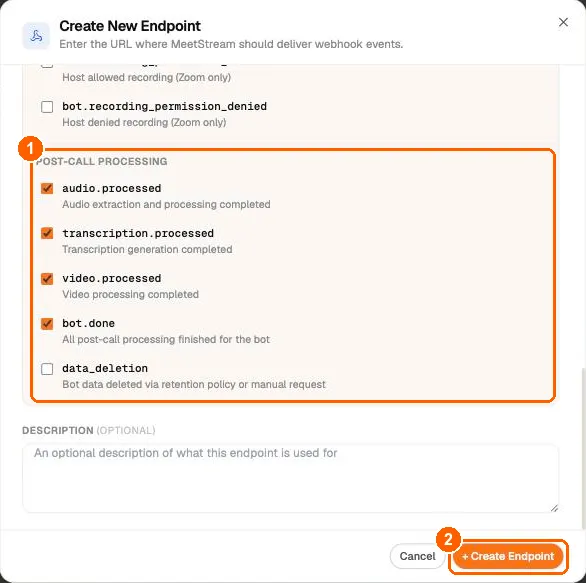
Some events are not listed in the dialog, for example bot.error, audio.failed, transcription.failed, transcription.skipped and participant events. You cannot switch them off here: every active endpoint receives them. Make your handler ignore event names it does not use. The full list is in the event catalog.
Create the endpoint and save the signing secret
Add an optional Description and click + Create Endpoint. The dialog switches to Webhook created and shows the Webhook secret with Reveal and Copy. Save it now: “we can’t show it to you again”. You can only regenerate it later.
Use the secret to verify signatures on every delivery. Click Done when it is stored in your secrets manager.
Manage an endpoint
Click an endpoint to open its detail view:
- Message Attempts: recent deliveries with STATUS, EVENT, MESSAGE ID, BOT ID and WHEN.
- Details: created and updated times and Status (Enabled or Disabled). Disabled endpoints receive nothing.
- Subscribed events: what this endpoint receives. Use Edit on the Endpoints tab to change it.
- Webhook secret: reveal it, or Regenerate it. Regenerating is immediate: “The previous secret will stop working”, so prepare your receivers to load the new secret first, then regenerate.
- Copy URL and Refresh in the header.
Delivery, timeouts and resending
Know these rules before you go to production:
- Delivery. MeetStream sends each event one time. If your endpoint returns an error or does not respond, the Logs tab shows the delivery as Failed, and you can resend it.
- Respond fast. Return a
2xxwithin 5 seconds and do the real work (downloads, transcription, database writes) asynchronously after you respond. A quick response keeps the next events for the same bot on time. - Resend from the Logs tab. The Logs tab is an event log for all endpoints. Search by event, bot or message ID, filter by Event type… and by status (All statuses, Success, Failed), and use RESEND on a row to deliver that event again. Delivery logs are kept for 90 days.
- Post-call events can arrive in any order. For example,
audio.processedcan arrive before or aftertranscription.processed. Usebot.doneas the “everything for this bot is finished” signal. - Handle duplicates. A resend delivers the event again with a new
timestamp. A resend carriesevent,bot_id,status,messageandcustom_attributes. Make your handler idempotent, for example with a key ofbot_idplus the event name. You can resend each delivery up to 10 times.
During development, receive events on your laptop with the MeetStream CLI and a tunnel:
See Set Up Local Server for Webhook for the manual version.
Next steps
- Webhooks and Events: the payload format, every event and how bot endings are reported.
- Verifying Webhook Signatures: copy-paste verification for Python and Node.
- Bot status and error code reference: what each
bot_statusand error message means and how to fix it. - Debugging Bots: event-by-event troubleshooting.