
Usage & Retention
Usage & Retention
What accrues usage
Usage accrues on meeting time — the time a bot spends in a call. A few consequences worth designing around:
- A bot lingering in an empty meeting keeps accruing recording minutes. The
everyone_left_timeoutandvoice_inactivity_timeoutknobs exist exactly for this — see Automatic Leave Configuration. in_call_recording_timeout(default 4 hours, max 5 hours) is the hard stop so a stuck recording can’t run for days against your credits.bot_detectionauto-leaves when another notetaker is present, so you stop paying for meeting time you don’t want. It has no separate charge.- Duplicate-create replays don’t double-charge: an
Idempotency-Keyreplay (507) ordeduplication_keyreplay (200) returns the original bot, and only the original successful create charges credits.
Current per-hour pricing lives on meetstream.ai/pricing.
The Usage dashboard
app.meetstream.ai/usage shows bot hours, meetings recorded, and average meeting length, with daily/weekly/monthly granularity, CSV and PDF export, and a per-bot breakdown that includes each session’s duration, metadata (API key label, bot ID), and cost:
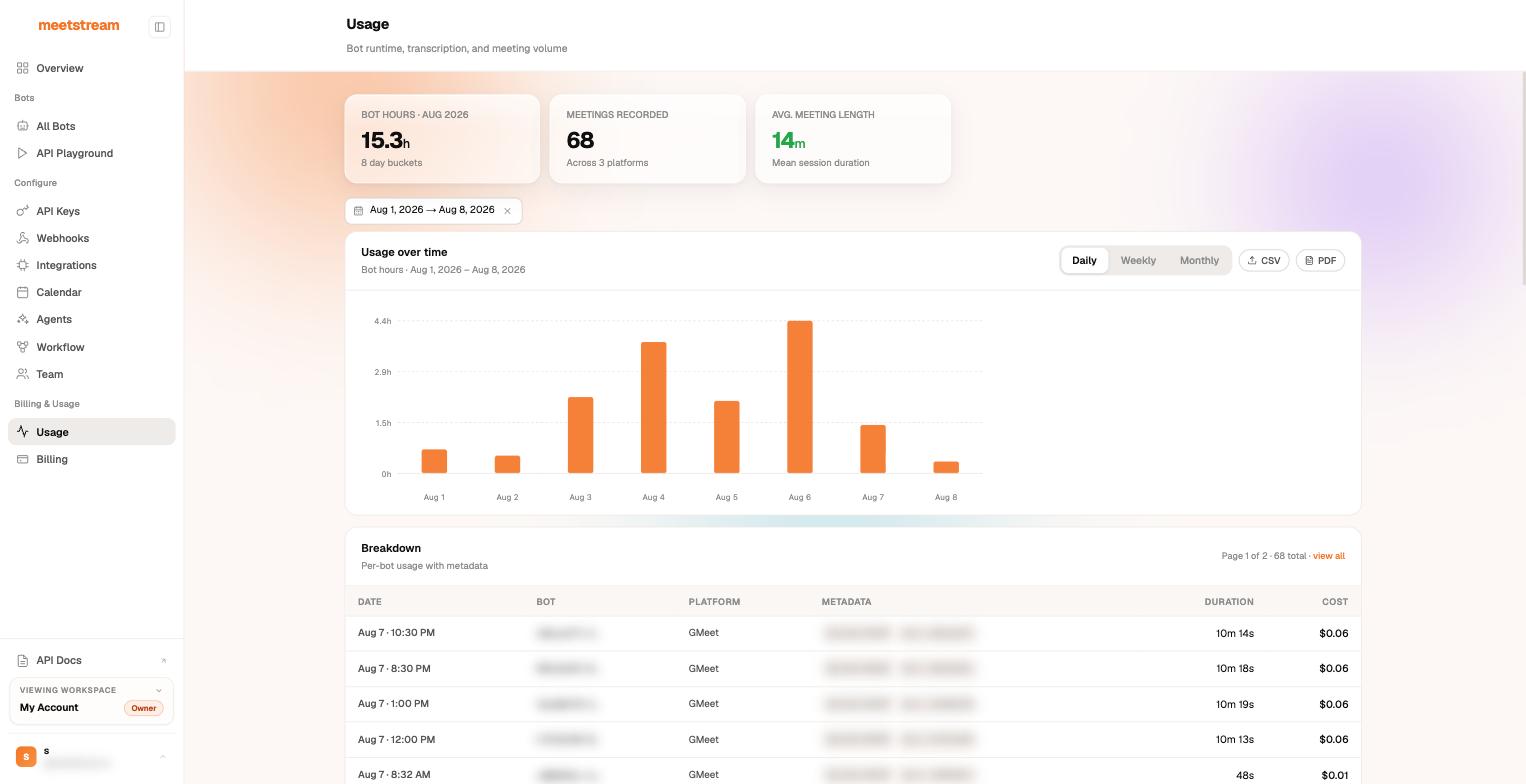
Because every row carries the API key label and any custom_attributes you set at create time, you can attribute usage per environment, per customer, or per feature — set custom_attributes on create_bot and filter the List Bots endpoint with custom_attr[...] params the same way.
Retention
Recording media is retained according to recording_config.retention:
- Default retention is 30 days (720 hours), included in the base rate at no extra charge (CLI:
--retention-hours). - Retention beyond 30 days is billed at $0.05 per GB per month (see pricing).
- Set a shorter window, for example
"hours": 24, to delete media sooner for data-minimization or compliance reasons. - When retention expires — or you call
DELETE /bots/{bot_id}/delete— adata_deletionwebhook fires, the bot’s status becomesMediaExpired, and artifact endpoints return 404/410 from then on. - The delete response reports how many objects were removed.
If you want recordings to live in infrastructure you control (and set your own lifecycle rules), use Custom Storage (BYO S3) — MeetStream writes audio, video, transcripts, and metadata straight into your bucket, including S3-compatible stores like Cloudflare R2 and MinIO.
Presigned URL lifetimes
Artifact download links are presigned and expire — re-request the endpoint for fresh links rather than storing URLs:
Next steps
- Automatic Leave Configuration — the spend-protection timeouts in detail
- Custom Storage Configurations
- Deduplication & Idempotency Keys