
Debugging Bots

Why didn't my bot join? Statuses, events, and the fastest paths to an answer
View as Markdown

When a bot doesn’t do what you expected, the answer is almost always in one of three places: the status timeline, the webhook events, or a timeout that fired. This page maps symptoms to causes.

Start at the dashboard

The All Bots view shows every bot with its live status, duration, and platform — filterable by lifecycle stage (Scheduled, Joining, In Waiting Room, In Meeting, Recording, …), date, and platform, with CSV export:
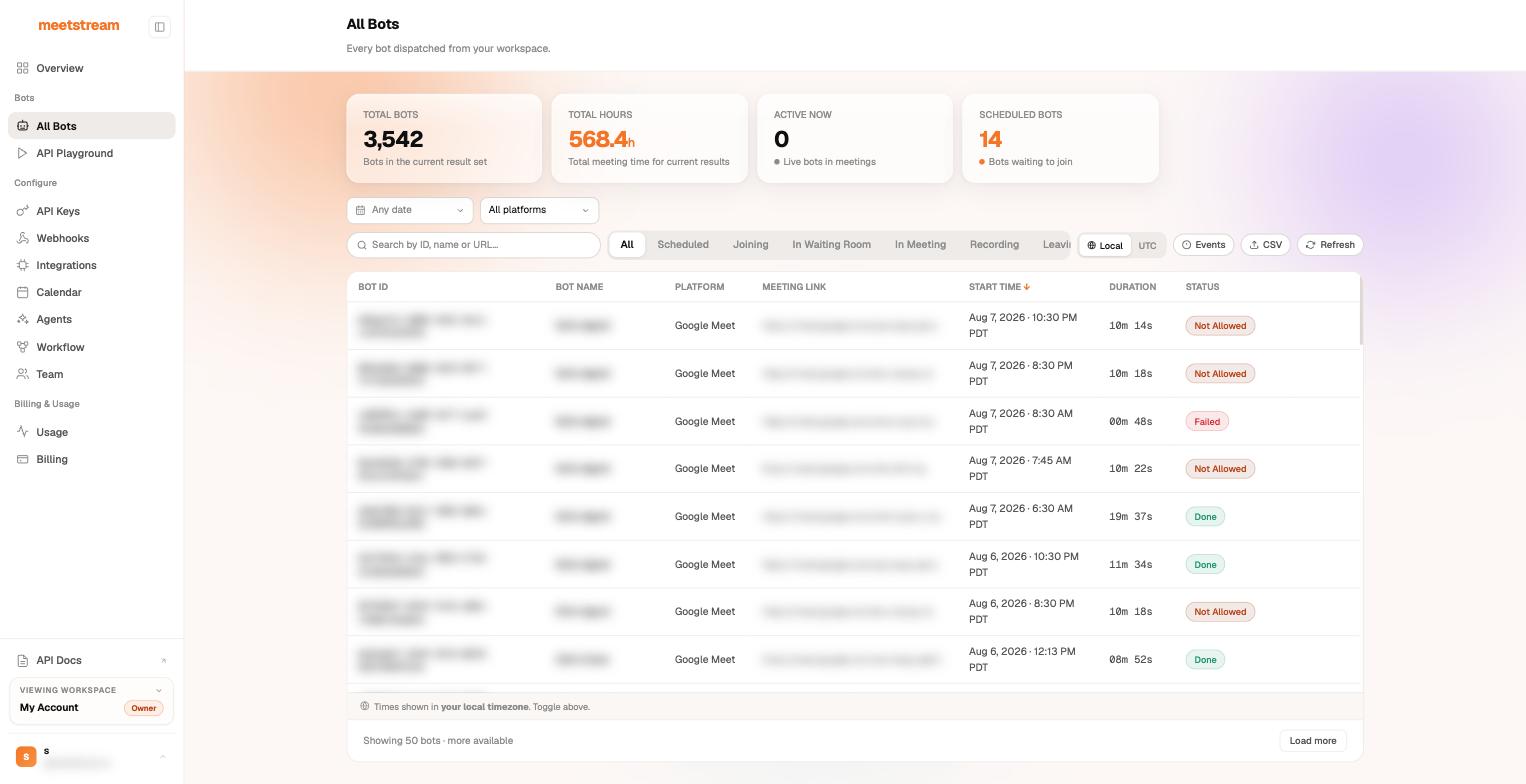
All Bots view in the MeetStream dashboard: stats, lifecycle filters, and per-bot status chips

For any single bot, GET /api/v1/bots/{bot_id}/detail returns the full session: platform, timings, StatusTimeline, the original request payload, and the transcript_id.

The lifecycle

A successful recording bot moves through:

bot.joining → bot.in_waiting_room → bot.inmeeting → bot.recording
→ bot.leaving → bot.stopped
→ audio.processed → transcription.processed → video.processed → bot.done

Key semantics:

  • Exactly one terminal in-meeting event per bot: bot.stopped, bot.kicked, bot.denied, bot.notallowed, or bot.failed.
  • bot.stopped carries a bot_status that says why: Stopped (normal), NotAllowed, Denied, or Error.
  • bot.kicked carries bot_status: "Stopped" — branch on the event name to detect kicks.
  • Clean terminals use status_code: 200; failure terminals use status_code: 500. Failure message strings are prefixed "Error: ..." (unexpected) or "Failed: ..." (handled: validation, timeout, denial) — useful for alert routing.
  • bot.done always has status_code: 200: it means the post-call pipeline finished, not that every step succeeded — check the individual artifact events.
  • On Zoom only, bot.recording_permission_allowed / denied fire between bot.inmeeting and bot.recording — see Zoom bots.

Live integrations receive the envelope under the event key. Older payloads may use bot_event — the CLI and MCP server implement the live-verified event model.

Symptom → cause

SymptomWhat actually happenedWhere to confirm
”The bot never showed up”It’s usually in the lobby: on Google Meet with Host management on, regular attendees can’t even see the admission requestStatus shows InWaitingRoom; see lobby guide
Terminal bot.notallowedNobody admitted the bot before waiting_room_timeout (defaults: Meet/Zoom 600s, Teams 1200s)Raise the timeout, or use a signed-in bot on the invite to skip the lobby
Terminal bot.deniedA human explicitly rejected the join requestNothing to fix in code — it’s a host decision
Terminal bot.failedJoin failure or crash; message prefix tells you Failed: (handled) vs Error: (unexpected)On Zoom, check dev-mode credentials and password-protected links
bot.leaving right after bot.joining, no bot.inmeetingThe join failed before entering the meetingCheck the meeting link is valid and live
Bot left “on its own” mid-meetingA timeout fired: everyone_left_timeout, voice_inactivity_timeout, noone_joined_timeout, or in_call_recording_timeout — whichever expires first winsThe bot.stopped message names the trigger; tune in automatic leave
Bot left when another notetaker joinedYour bot_detection.using_participant_names matchedThe stop message contains bot_detection.using_participant_names
Zoom bot joined but never recordedHost didn’t grant recording permission within recording_permission_denied_timeout (60s default)Clean bot.stopped after bot.recording_permission_denied
Audio/video endpoint returns 202Artifacts aren’t ready: per-participant streams return 202 while the bot is still in the meeting or processing (stage field says where it is)Poll again in 10–30 seconds
Transcript “not ready” after bot.stoppedPost-call transcription still running — or you used a streaming-only provider (deepgram_streaming, assemblyai_streaming, meeting_captions), which never produces a post-call transcription.processedRetry shortly; for streaming providers, your live webhook already has the text
Artifact endpoints return 404/410 on an old botRetention expired or the data was deleted — status is MediaExpired, and a data_deletion event firedSee usage & retention
Webhook never arrivedDelivery is best-effort: non-2xx responses and unreachable URLs are not retriedTest locally with meetstream listen + ngrok

Watch it live

Two fast feedback loops while developing:

$# 1. Pretty-print every webhook event as it happens
$meetstream listen --port 3333 # then: ngrok http 3333
$meetstream bot create "<link>" -c https://<ngrok>.ngrok.io/webhook
$
$# 2. Poll a bot to a terminal state
$meetstream bot status <bot_id> --watch

Or let your agent do it: the MeetStream MCP server exposes bot status, details, and transcripts as tools, so Claude can debug a bot session for you.

Status reference

Wire values you’ll see in GET /bots/{id} and webhook payloads:

Scheduled · Joining · InWaitingRoom · InMeeting · Recording · RecordingPermissionAllowed · RecordingPermissionDenied · Leaving · Stopped · NotAllowed · Denied · Error · MediaProcessing · Done · MediaExpired

MediaProcessing (post-call pipeline running) has no webhook of its own; Done corresponds to bot.done, MediaExpired to data_deletion.

Next steps