
Live Meeting Transcription via Webhook
Get transcript updates on your webhook while the meeting is still going, a second or two after people speak.
You choose a streaming provider and a webhook URL; the bot sends the meeting audio to the provider and POSTs each result to your webhook.
Platform support
One streaming provider runs per bot. If you list several, only one is used, so list only the one you want. The rest of the platform matrix is on Meeting Platforms Supported.
1) What you need
- A webhook endpoint that accepts POST requests on a public
https://URL. live_transcription_required.webhook_urlin your Create Bot request.- One streaming provider under
recording_config.transcript.provider. - For Deepgram, AssemblyAI, Sarvam or JigsawStack: your provider key saved under Integrations > Transcription in the dashboard (details).
meetstream_streamingneeds no key.
You can build the same request in the dashboard’s API Playground, on the Transcribe step:
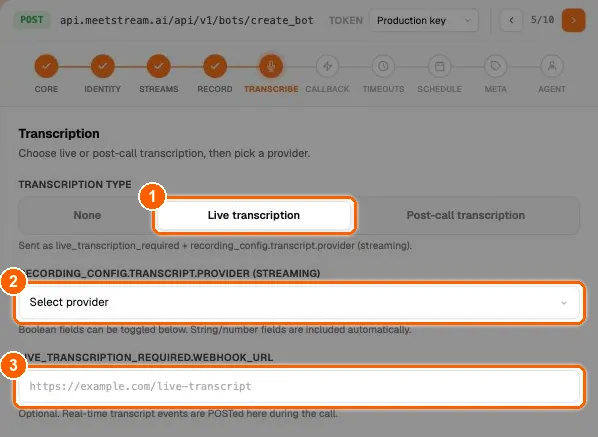
The two go together: a streaming provider without webhook_url is rejected with 400 (live_transcription_required.webhook_url is mandatory when using streaming providers: ...), and a webhook_url without a streaming provider (or meeting_captions) is rejected too.
Tip: For local testing, expose your server with a tunnel. See set up a local server for webhooks.
2) Add live_transcription_required to your bot payload
This is where MeetStream will POST live transcript updates.
3) Choose a streaming provider (payload examples)
A) AssemblyAI Streaming (assemblyai_streaming)
B) Deepgram Streaming (deepgram_streaming)
Set model explicitly: the default differs by platform.
C) MeetStream-hosted (meetstream_streaming)
No provider key needed.
transcription_mode
Any other value is rejected with 400 (Invalid transcription_mode: ...).
Only one streaming provider runs per bot. You can add a post-call provider in the same request if you also want a clean transcript after the meeting. See transcription providers.
4) What your webhook will receive
Every POST has Content-Type: application/json. Common fields:
sentence mode
word_level mode
raw mode
raw adds the provider’s own fields: words, utterance, is_final (Deepgram), and end_of_turn, turn_is_formatted, turn_order, end_of_turn_confidence (AssemblyAI). Interim results arrive with is_final: false and are replaced by later POSTs.
words[] entries come from the provider, so their exact keys depend on which provider you chose.
5) Recommended implementation pattern
A) Always ACK fast
Respond 2xx immediately and do the work asynchronously. Live transcript POSTs are sent once: they are not retried, and a slow endpoint can make you miss updates.
B) Protect the endpoint
Live transcript POSTs are not signed (unlike the lifecycle webhooks). Use a hard-to-guess URL path, check that bot_id is one of your bots, and ignore anything else.
C) Store and stream
- Live UI captions: use
word_level, orrawand show interim text untilis_final/end_of_turn. - Analytics and triggers: use
sentence; each POST is a finished phrase. - Persist to a database: store
sentencePOSTs, orrawPOSTs whereis_finalis true.
D) De-duplicate
Updates can arrive close together. De-duplicate on {bot_id, timestamp, transcript} or a hash of the body.
E) Pausing
While recording is paused, no transcript is produced, because the provider receives silence (or nothing).
6) Troubleshooting
-
No live transcription arriving?
- Check the bot got into the meeting: transcription starts after admission. See bot status and error codes.
- Confirm
live_transcription_required.webhook_urlis reachable publicly (trycurl -X POST) and returns2xx. - On Zoom and Teams,
jigsawstack_streamingproduces nothing. Use another streaming provider. - Check your provider key is saved and valid. When the provider rejects the connection, a
bot.errorevent is sent to your webhooks with the reason.
-
Payloads arrive but the UI looks jumpy?
- In
rawmode, treatis_final: falseas interim and replace it with the next update. - Or switch to
sentencemode.
- In
-
Speaker names look wrong on Google Meet or Teams?
- Live labels there follow the active or dominant speaker, so quick back-and-forth or crosstalk can be attributed to the wrong person. Add a post-call provider to the same request for a final transcript with speaker labels from the recording.