
Live Audio Capture & Frame Decoding
MeetStream streams real-time meeting audio to your application over a WebSocket connection. Audio arrives as speaker-tagged binary frames. Google Meet and Microsoft Teams send frames of type 0x01 at 48 kHz. Zoom sends frames of type 0x04, which carry the sample rate in the header (32 kHz).
Overview
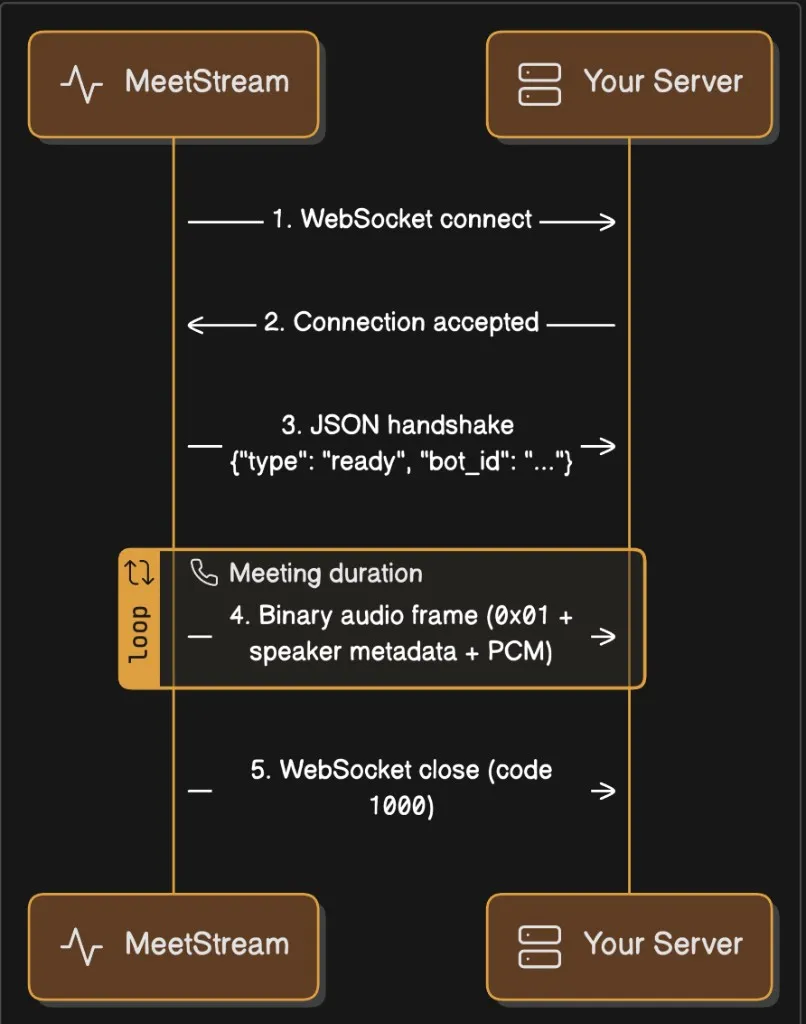
When you create a bot with the live_audio_required configuration, MeetStream opens a WebSocket connection from the bot to your server and continuously streams binary audio frames for the duration of the meeting.
Enabling Live Audio
Include live_audio_required in your Create Bot API request:
The websocket_url is a WebSocket endpoint you host. MeetStream connects to it as a client.
Connection Lifecycle
1. Bot connects to your WebSocket endpoint
The bot initiates the connection when it joins the meeting.
2. Bot sends a JSON text handshake
The first message is always a JSON text frame:
3. Binary audio frames stream continuously
Every subsequent message is a binary WebSocket frame containing PCM audio with embedded speaker metadata. Frames arrive continuously for the duration of the meeting.
4. Connection closes when the bot leaves
The WebSocket closes with a normal 1000 close code when the bot exits the meeting.
Timeline
Binary Frame Format
Every audio frame is a single binary WebSocket message. Byte 0 is the message type:
0x01: Google Meet and Microsoft Teams. PCM16 mono at 48 kHz.0x04: Zoom. The header carries the sample rate and the channel count.
Type 0x01 (Google Meet and Microsoft Teams):
Type 0x04 (Zoom):
Field-by-Field Breakdown
H is the header length before the speaker fields: 1 for 0x01 frames and 6 for 0x04 frames.
Important
- There are no delimiters between fields. The format is length-prefixed: you read the 2-byte length, then read that many bytes for the string.
- The
sid_lengthandsname_lengthvalues change depending on the length of the speaker’s name and ID. These are not fixed values or delimiters. They are standard unsigned 16-bit little-endian integers encoding a string length. - Read byte 0 first.
0x01and0x04are the audio message types. Skip frames with any other type, so that your code keeps working if new types are added.
Audio Properties
To calculate duration from a frame:
Hex Dump Walkthrough
A Google Meet frame (0x01) from a speaker named "Alice" with ID "user_42":
A Teams frame (0x01) from "James Chen" with ID "James Chen":
A Zoom frame (0x04) at 32 kHz mono from "Alice" with ID "16778240":
Note: 0x07 = 7, 0x0A = 10, 0x0E = 14, etc. These are string lengths, not protocol markers.
Decoding Examples
Each decoder reads byte 0, takes the sample rate from the frame, and returns it with the speaker fields and the audio.
Python
JavaScript / Node.js
Go
Java
Full Receiver Examples
Python — Receive and Log
Node.js — Receive and Log
Working with PCM Audio
Convert to NumPy Array (Python)
Save as WAV File (Python)
Accumulate and Save a Full Meeting Recording
Resample to a Different Rate (Python)
Many speech-to-text services expect 16 kHz audio. Resample with numpy:
Convert to Int16 Array in JavaScript
Speaker Identification
Each frame includes both a speaker_id and a speaker_name:
Platform Behavior
Handling "NoSpeaker"
When no speaker is identified for a frame, both fields are "NoSpeaker", for example in the first moments of a meeting.
Message Types on the Audio Channel
Check byte 0 and skip unknown types, so that your code keeps working if new types are added.
FAQ
What sample rate does the audio arrive at?
Google Meet and Teams: 48,000 Hz. Zoom: 32,000 Hz. Read the rate from the 0x04 header, so that your code also works if the rate changes.
Is the audio mixed or per-speaker?
Google Meet: mixed audio, tagged with the active speaker. Teams: mixed audio, tagged with the dominant speaker. When per-participant audio is on, Teams sends per-participant frames. Zoom: one frame for each speaker, with that speaker’s speech only.
How large is each frame?
Frame sizes vary. Typical frames contain 1,000 to 50,000+ samples (20 ms to 1+ seconds of audio). The size depends on the platform’s audio capture interval and buffering.
Can I receive audio from specific speakers only?
Filter on speaker_id or speaker_name after you decode each frame. On Zoom, each frame carries one speaker’s speech. On Google Meet and Teams, frames carry mixed audio tagged with the active or dominant speaker. For one file for each participant after the call, use per-participant audio.
Do I need to send an acknowledgment for each frame?
No. The protocol is fire-and-forget. The bot streams continuously and does not expect any response on the audio channel.
What happens if my server is slow to consume frames?
Frames will buffer in the WebSocket layer. If the buffer grows too large, the connection may drop. Ensure your receiver processes or discards frames promptly.
Why does the sid_length value change between sessions?
The 2-byte length field reflects the byte length of the speaker’s ID string. Different speakers have different name/ID lengths:
"Alice"= 5 bytes →sid_length=0x05 0x00"James Chen"= 10 bytes →sid_length=0x0A 0x00"Bob"= 3 bytes →sid_length=0x03 0x00
This is not a delimiter or protocol variation. It is a standard length-prefixed string encoding.
How should I parse the binary format defensively?
Always read the 2-byte length, then read exactly that many bytes. Never hard-code expected length values. A correct parser:
An incorrect parser:
Can speaker names contain non-ASCII characters?
Yes. Speaker names are UTF-8 encoded. A name like "Javier Martínez" is 16 bytes, while "佐藤太郎" is 12 bytes (3 bytes per CJK character). Always use the length prefix. Never scan for fixed byte patterns.
What if I only need the audio and don't care about speaker info?
Skip past the headers:
The audio is at 48 kHz for 0x01 frames. For 0x04 frames, read the rate from bytes 1 to 4.