
Bot Status and Error Code Reference
Use this page to turn any bot outcome into a cause and a fix. Look up the status, bot_event, ErrorReason or message you received, then follow the link in the What to do column.
Where to read these values
Statuses, bot_event names, ErrorReason codes and messages grow as MeetStream adds platforms and detection. Treat unknown values gracefully: log them, fall back to the generic handling for the event (for example, treat any unknown terminal as a failure you can retry), and never crash on a value you have not seen. Compare status strings case-insensitively, because some Google Meet paths write FAILED and ERROR in upper case.
The bot lifecycle
The diagram is simplified: a scheduled bot can also be Cancelled before it starts or end in Error if it cannot be started, and a join can end early as Failed (the meeting blocked it) or Error. Recording is not drawn because it is recorded in the timeline without changing status (see below). Every platform writes Leaving immediately before the terminal status, except the Google Meet join blockers, which go straight from Joining to Failed.
What each status means
create_bot returns "status": "Active" in its 201 body for immediate bots and "status": "Scheduled" for scheduled bots. Active is only a response value; the stored status of an immediate bot is Joining.
What happens to status after the call
- Bots that were in the meeting (
StoppedorKicked) move toMediaProcessing, thenDone. - Bots that never got in (
NotAllowed,Denied,Failed,FAILED,ERROR) keep that status. They still get abot.donewebhook, whosebot_statusrepeats the join outcome (for exampleNotAllowed). - Bots that end in
Erroron Zoom or Teams currently also move toMediaProcessingand thenDone, so their finalstatusreadsDone. To keep the real outcome, store the terminal webhook, or read theError(Zoom) orFailed(Teams) entry inStatusTimelineand theErrorReasonfrom/detail. - The timeline also records post-call stages:
AudioProcessing(“Processing Audio”),VideoProcessing(“Processing Video”),Uploading,TranscriptionReady(“Transcript Ready”) andDone.
Webhook mapping
Every status change becomes one webhook delivery. Terminal statuses all share event: "bot.stopped"; branch on bot_event (or bot_status) for the reason.
On Google Meet, bot.recording is currently delivered only for bots created with a callback_url. The Recording entry is always written to StatusTimeline.
You may also receive informational post-call events bot.uploading and bot.transcriptionready (their bot_status equals the event name), and bot.error in two cases: a live transcription provider failed while the bot stays in the meeting (bot_status: "InMeeting"), or a scheduled bot was rejected when it tried to start (see scheduling reasons).
status_code in webhooks
status_code is a hint, not the outcome. Always branch on bot_event or bot_status.
Message prefixes
MeetStream prefixes failure messages so you can route alerts without parsing the rest of the text:
Error:forError,ERRORandFAILED(something broke: credentials, tokens, link format, or a MeetStream-side problem).Failed:forNotAllowed,DeniedandFailed(the meeting, host or lobby decided).- The prefix is never doubled, and messages that already start with
Error:orFailed:are left as they are.
Error reasons by platform
ErrorReason is a stable PascalCase code on GET /api/v1/bots/{bot_id}/detail. Google Meet and Microsoft Teams bots set it for join failures and for unexpected exits. Zoom bots describe the cause in message instead, so the Zoom section below is keyed by message. The scheduling and safety-check reasons apply to every platform.
The dashboard shows a friendly label for failures (for example “Invalid meeting link” or “Bot not allowed to join meeting”) and hides internal-only codes. The API returns the code.
Scheduling and safety checks (all platforms)
Google Meet
Join blocked by the meeting. Status Failed, bot_event: "bot.failed", status_code: 500, and the webhook includes failure_reason.
Lobby and host decisions.
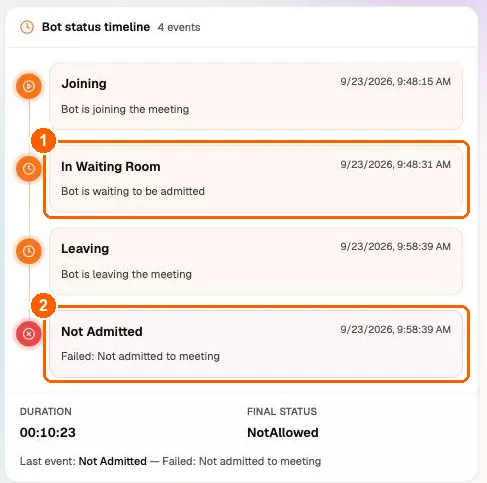
Temporary Google Meet errors. MeetStream retries these automatically (up to three attempts). If every attempt fails, the bot ends as Failed with a message ending in (after 3 attempts).
MeetStream-side join errors. Status FAILED or ERROR, usually with the message Failed: Could not join meeting or a short detail. These are not caused by your request.
JoinFailed, JoinButtonTimeout, ClickJoinFailed, MeetingNotLoaded, NavigateFailed, ServicesInitFailed, BrowserInitFailed, JoinFlowException, FillDisplayNameFailed, WaitForMeetingFailed, BrowserPageLost.
What to do: create a new bot. If the same meeting fails repeatedly, send the bot_id to support.
Exits during the meeting. The bot was in the meeting, so the recording up to that point is processed normally.
Automatic-leave exits on Google Meet use Stopped without an ErrorReason: Bot exited the call: No one joined the meeting, Bot exited the call: Everyone left the meeting, Bot exited the call: Voice inactivity for Ns (threshold: Ns), and Bot exited the call: Only other bots remain (...) with the matched names. See automatic leave.
Microsoft Teams
Lobby, host and meeting decisions.
Sign-in walls and signed-in bots.
MeetStream-side join errors.
Normal Teams exits use Stopped without an ErrorReason: Bot exited the call: Meeting was ended by the host, Bot exited the call: Everyone left the meeting, Bot exited the call: Voice inactivity timeout, Bot stopped via API request, and Bot exited the call.
Zoom
Zoom bots report the cause in message. Match on the text after the prefix.
Admission and permissions.
The meeting could not be joined. These end as Stopped (not a failure status), so check the message.
The meeting ended. Status Stopped.
Automatic leave and API stops. Status Stopped: Bot exited the call: Voice inactivity timeout, Bot exited the call: Everyone left the meeting, Bot exited the call: Maximum recording time reached, Bot exited the call: only other bots remain (bot_detection.using_participant_names), Bot stopped via API request, and Bot exited the call. See automatic leave.
Errors. Status Error, bot_event: "bot.failed".
HTTP errors from create_bot
These come back synchronously, before a bot exists, so no status or webhook is created. The body is { "message": "..." } unless noted. See Errors for the general API error model.
For scheduled bots, the signed-in login checks run again at join time. If they fail then, the bot ends as Error with ErrorReason: "ScheduledDispatchRejected" instead of returning an HTTP error.
Errors from in-meeting commands
Commands such as send message, send image, pause and resume go to a running bot.