
Post-Call Meeting Transcription: Speaker-Labeled Transcripts After the Call
Get a clean, speaker-labeled transcript of the whole meeting a few minutes after the bot leaves.
Supported providers:
deepgramassemblyaijigsawstacksarvammeetstream(MeetStream engine, no provider key needed)meeting_captions(native captions from Google Meet and Microsoft Teams; not Zoom)
Platform support
See meeting captions for the caption details and the capability matrix for everything else.
1) Enable transcription in recording_config
When calling Create Bot, put the provider under recording_config.transcript.provider:
recording_config.transcript.provider is the only location read. An old top-level transcription field is ignored: the bot still records, but you get no transcript.
- One post-call provider runs. If you list more than one, the first in this order is used:
deepgram,assemblyai,jigsawstackormeetstream,sarvam. - You can add a streaming provider in the same request for a live transcript as well. See live transcription.
deepgram,assemblyai,jigsawstackandsarvamuse your own provider key, saved in the dashboard under Integrations > Transcription. Without it, Create Bot returns400, for exampleDeepgramAPIKey not configured in user profile.meetstreamneeds no key. See who supplies the API key.
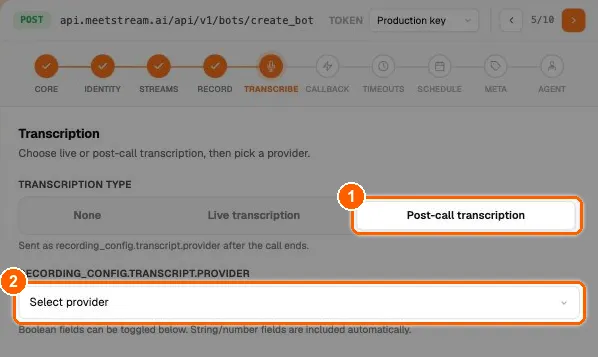
In the dashboard’s API Playground, the same choice is on the Transcribe step:
2) Provider payload examples
A) JigsawStack (jigsawstack)
Set language to auto or choose from JigsawStack’s 163 codes for 162 supported languages.
B) Deepgram (deepgram)
C) AssemblyAI (assemblyai)
D) Sarvam AI (sarvam)
E) MeetStream AI (meetstream)
F) Meeting captions (Google Meet and Teams)
Not supported on Zoom. On Teams, captions must already be running in the meeting.
Provider options are passed through to the provider as you send them. MeetStream does not check model or language names, so a typo surfaces as a failed transcript (transcription.failed), not as a Create Bot error.
3) Getting transcript_id after creating the bot
The Create Bot response includes a transcript_id for every post-call provider and for meeting_captions:
Store it. You can also read it later from GET /api/v1/bots/{bot_id}/detail.
4) Fetch the post-call transcript
A) Standard transcript (formatted)
B) Raw provider output
5) Fetch native captions (meeting_captions)
Captions use the same get_transcript call with the transcript_id above; during the call it returns the captions collected so far. You can also download the raw caption file from bot details:
The caption_file field is {"available": true, "download_url": "..."} when captions exist (link valid for 1 hour), or {"available": false}.
6) Recommended workflow
- Create the bot with
recording_config.transcript.providerset, and storebot_idandtranscript_id. - Listen for webhooks. The post-call ones are:
transcription.processed: the transcript is ready. Fetch it withtranscript_id.transcription.failed: the provider failed. Themessagehas the reason.transcription.skipped: there was no audio to transcribe.bot.done: the whole post-call pipeline has finished.
- For
meeting_captions, there is notranscription.processed. Fetch the captions afterbot.done. - A bot that was never admitted (
NotAllowed,Denied) sends notranscription.*event at all;bot.donestill fires.
7) Re-transcribe a recording
Try another provider or language on the same recording, without re-recording:
It returns a new transcript_id. Only after the bot has left the meeting (409 before that), and only if audio was recorded (404 otherwise). meetstream can be used once per bot. More in transcription providers.
Troubleshooting
- No transcript and no
transcription.*webhook?- Check the provider is under
recording_config.transcript.provider, not a top-leveltranscriptionfield. - Check the bot was admitted. A bot that ended as
NotAllowedorDeniedrecorded nothing. See bot status and error codes.
- Check the provider is under
202right after the meeting? Processing takes a few minutes for long meetings. Wait fortranscription.processed.transcription.failed? Check the model and language values are valid for that provider, and that your saved provider key is current.meeting_captionsreturned404? On Zoom this is expected (not supported). On Teams, captions were probably not running in the meeting. On Google Meet, check the bot was admitted.