Live Audio Capture & Frame Decoding
MeetStream streams real-time meeting audio to your application over a WebSocket connection. Audio arrives as speaker-tagged binary frames from Google Meet, Zoom, and Microsoft Teams — all using the same wire format.
Overview
When you create a bot with the live_audio_required configuration, Meetstream opens a WebSocket connection from the bot to your server and continuously streams binary audio frames for the duration of the meeting.
Enabling Live Audio
Include live_audio_required in your Create Bot API request:
The websocket_url is a WebSocket endpoint you host. Meetstream connects to it as a client.
Connection Lifecycle
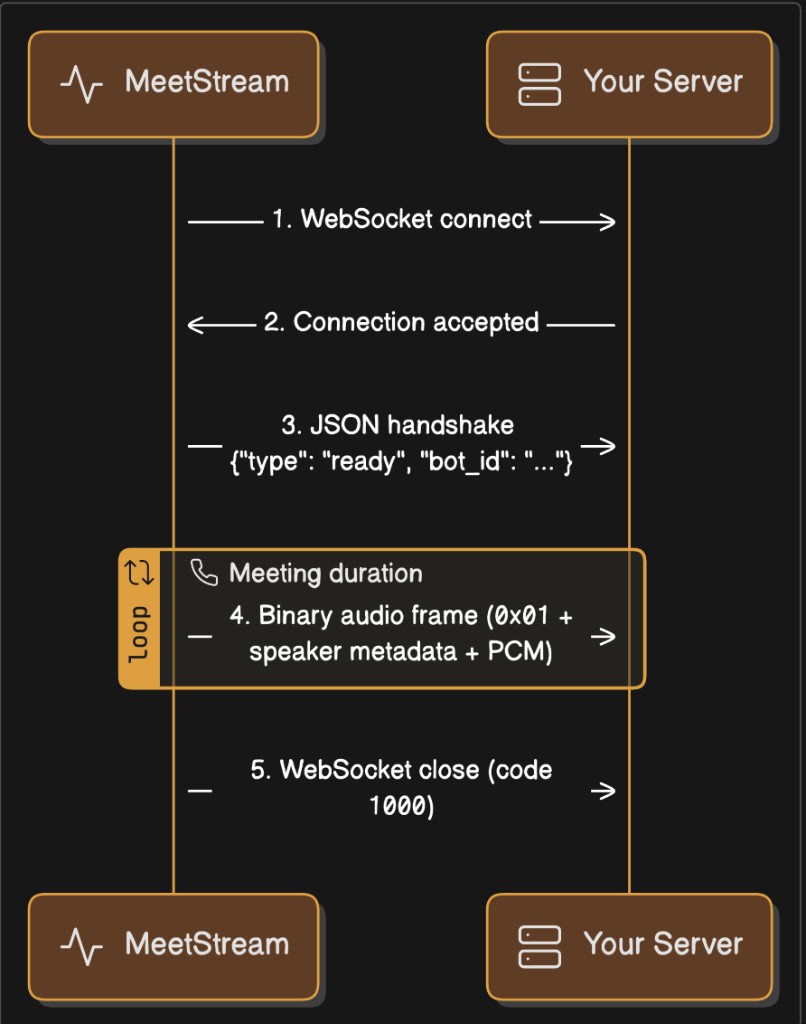
1. Bot connects to your WebSocket endpoint
The bot initiates the connection when it joins the meeting.
2. Bot sends a JSON text handshake
The first message is always a JSON text frame:
3. Binary audio frames stream continuously
Every subsequent message is a binary WebSocket frame containing PCM audio with embedded speaker metadata. Frames arrive continuously for the duration of the meeting.
4. Connection closes when the bot leaves
The WebSocket closes with a normal 1000 close code when the bot exits the meeting.
Timeline
Binary Frame Format
Every audio frame is a single binary WebSocket message with this structure:
Field-by-Field Breakdown
Important
- There are no delimiters between fields. The format is length-prefixed: you read the 2-byte length, then read that many bytes for the string.
- The
sid_lengthandsname_lengthvalues change depending on the length of the speaker’s name and ID. These are not fixed values or delimiters — they are standard unsigned 16-bit little-endian integers encoding a string length. 0x01is currently the only defined message type. All binary frames on this channel will have0x01at byte 0.
Audio Properties
To calculate duration from a frame:
Hex Dump Walkthrough
A frame from a speaker named "Alice" with ID "user_42":
A frame from "James Chen" with ID "James Chen":
Note: 0x07 = 7, 0x0A = 10, 0x0E = 14, etc. These are string lengths, not protocol markers.
Decoding Examples
Python
JavaScript / Node.js
Go
Java
Full Receiver Examples
Python — Receive and Log
Node.js — Receive and Log
Working with PCM Audio
Convert to NumPy Array (Python)
Save as WAV File (Python)
Accumulate and Save a Full Meeting Recording
Resample to a Different Rate (Python)
Many speech-to-text services expect 16 kHz audio. Resample with numpy:
Convert to Int16 Array in JavaScript
Speaker Identification
Each frame includes both a speaker_id and a speaker_name:
Platform Behavior
Handling "NoSpeaker"
If the bot cannot determine the active speaker, both fields will be "NoSpeaker". This can happen during the first moments of a meeting or during mixed audio when speaker attribution is unavailable.
Message Types on the Audio Channel
0x01 is currently the only binary message type. All binary frames will have 0x01 at position 0. Future protocol versions may introduce additional types — check byte 0 and skip unknown types for forward compatibility.
FAQ
What sample rate does the audio arrive at?
48,000 Hz for all platforms (Google Meet, Zoom, Teams).
Is the audio mixed or per-speaker?
The audio is mixed — it contains all meeting participants combined into a single mono stream. Speaker metadata (speaker_id, speaker_name) indicates who was the dominant speaker when the frame was captured, but the audio itself contains everyone.
How large is each frame?
Frame sizes vary. Typical frames contain 1,000 to 50,000+ samples (20ms to 1+ seconds of audio). The size depends on the platform’s audio capture interval and buffering.
Can I receive audio from specific speakers only?
No. The bot streams mixed audio. Use the speaker_name or speaker_id metadata for your own filtering or labeling logic after decoding.
Do I need to send an acknowledgment for each frame?
No. The protocol is fire-and-forget. The bot streams continuously and does not expect any response on the audio channel.
What happens if my server is slow to consume frames?
Frames will buffer in the WebSocket layer. If the buffer grows too large, the connection may drop. Ensure your receiver processes or discards frames promptly.
Why does the sid_length value change between sessions?
The 2-byte length field reflects the byte length of the speaker’s ID string. Different speakers have different name/ID lengths:
"Alice"= 5 bytes →sid_length=0x05 0x00"James Chen"= 10 bytes →sid_length=0x0A 0x00"Bob"= 3 bytes →sid_length=0x03 0x00
This is not a delimiter or protocol variation — it is a standard length-prefixed string encoding.
How should I parse the binary format defensively?
Always read the 2-byte length, then read exactly that many bytes. Never hard-code expected length values. A correct parser:
An incorrect parser:
Can speaker names contain non-ASCII characters?
Yes. Speaker names are UTF-8 encoded. A name like "Javier Martinez" is 16 bytes, while "佐藤太郎" is 12 bytes (3 bytes per CJK character). Always use the length prefix — never scan for fixed byte patterns.
What if I only need the audio and don’t care about speaker info?
Skip past the headers: