External Meeting Control & Command Patterns

View as MarkdownOpen in Claude

Send audio, chat messages, images, and playback controls into a live meeting through Meetstream’s control WebSocket channel. Works with Google Meet, Zoom, and Microsoft Teams.


Overview

When you create a bot with the socket_connection_url configuration, Meetstream opens a WebSocket connection from the bot to your server. You send JSON commands over this connection to control what the bot does inside the meeting.

Enabling the Control Channel

Include socket_connection_url in your Create Bot API request:

1{
2 "meeting_url": "https://meet.google.com/abc-defg-hij",
3 "socket_connection_url": {
4 "websocket_url": "wss://your-server.com/control"
5 }
6}

The websocket_url is a WebSocket endpoint you host. Meetstream connects to it as a client.


Connection Lifecycle

1. Bot connects to your WebSocket endpoint

The bot initiates the connection when it joins the meeting.

2. Bot sends a JSON text handshake

1{
2 "type": "ready",
3 "bot_id": "bot_abc123",
4 "message": "Ready to receive messages"
5}

After you receive this, the bot is ready to accept commands.

3. You send JSON commands

All commands are JSON text WebSocket frames. The bot executes them in the meeting.

4. Connection closes when the bot leaves

The WebSocket closes with a normal 1000 close code when the bot exits.

Timeline
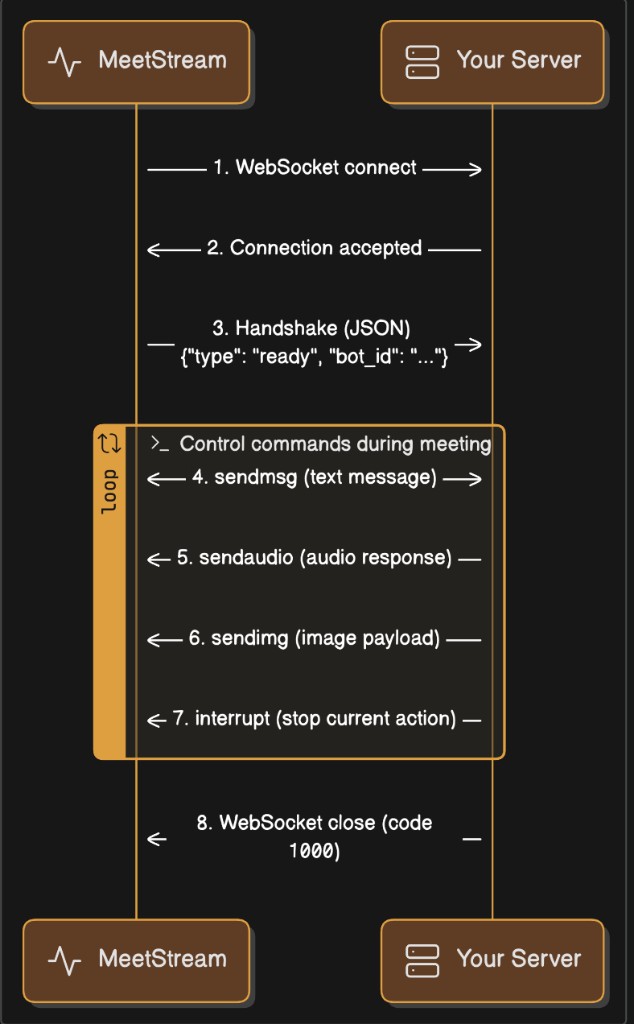
Control Command Lifecycle


Command Reference

All commands share this structure:

1{
2 "command": "<command_name>",
3 "bot_id": "<bot_id>",
4 ...fields specific to the command
5}

sendaudio — Play Audio in the Meeting

Plays audio through the bot’s virtual microphone so all meeting participants hear it. Use this for text-to-speech output, pre-recorded audio prompts, or any audio your application generates.

1{
2 "command": "sendaudio",
3 "bot_id": "bot_abc123",
4 "audiochunk": "<base64-encoded PCM16 LE audio bytes>",
5 "sample_rate": 48000,
6 "encoding": "pcm16",
7 "channels": 1,
8 "endianness": "little"
9}
FieldTypeRequiredDescription
commandstringyes"sendaudio"
bot_idstringyesThe bot identifier from the handshake
audiochunkstringyesBase64-encoded audio bytes
sample_rateintyesSample rate in Hz. 48000 recommended.
encodingstringno"pcm16" (only supported format)
channelsintno1 (mono only)
endiannessstringno"little"

Audio Encoding Requirements

The audiochunk field must be a base64-encoded string of raw PCM16 signed little-endian audio bytes. No WAV headers, no MP3 — just raw samples.

PropertyValue
FormatSigned 16-bit integer (PCM16)
Byte orderLittle-endian
Sample rate48,000 Hz recommended
Channels1 (mono)
ContainerNone — raw samples only
Transport encodingBase64

Encoding Audio — Python

1import base64
2import numpy as np
3
4def encode_pcm16_to_base64(pcm_bytes: bytes) -> str:
5 """Encode raw PCM16 LE bytes to base64 for the sendaudio command."""
6 return base64.b64encode(pcm_bytes).decode("utf-8")
7
8
9def float32_to_pcm16_bytes(float_audio: np.ndarray) -> bytes:
10 """Convert float32 audio (-1.0 to 1.0) to PCM16 LE bytes."""
11 clipped = np.clip(float_audio, -1.0, 1.0)
12 return (clipped * 32767).astype(np.int16).tobytes()
13
14
15def resample_to_48k(pcm_bytes: bytes, source_rate: int) -> bytes:
16 """Resample PCM16 LE audio from any sample rate to 48kHz."""
17 if source_rate == 48000:
18 return pcm_bytes
19 samples = np.frombuffer(pcm_bytes, dtype=np.int16).astype(np.float32)
20 num_output = int(len(samples) * 48000 / source_rate)
21 t_in = np.linspace(0, 1, len(samples), endpoint=False)
22 t_out = np.linspace(0, 1, num_output, endpoint=False)
23 resampled = np.interp(t_out, t_in, samples)
24 return np.clip(resampled, -32768, 32767).astype(np.int16).tobytes()
25
26
27def build_sendaudio_command(bot_id: str, pcm_bytes: bytes, sample_rate: int = 48000) -> dict:
28 """Build a complete sendaudio command ready to send over the WebSocket."""
29 return {
30 "command": "sendaudio",
31 "bot_id": bot_id,
32 "audiochunk": encode_pcm16_to_base64(pcm_bytes),
33 "sample_rate": sample_rate,
34 "encoding": "pcm16",
35 "channels": 1,
36 "endianness": "little",
37 }

Encoding Audio — JavaScript / Node.js

1function encodePcm16ToBase64(pcmBuffer) {
2 return pcmBuffer.toString("base64");
3}
4
5function float32ToPcm16Buffer(float32Array) {
6 const pcm = Buffer.alloc(float32Array.length * 2);
7 for (let i = 0; i < float32Array.length; i++) {
8 const clamped = Math.max(-1, Math.min(1, float32Array[i]));
9 pcm.writeInt16LE(Math.round(clamped * 32767), i * 2);
10 }
11 return pcm;
12}
13
14function buildSendAudioCommand(botId, pcmBuffer, sampleRate = 48000) {
15 return {
16 command: "sendaudio",
17 bot_id: botId,
18 audiochunk: encodePcm16ToBase64(pcmBuffer),
19 sample_rate: sampleRate,
20 encoding: "pcm16",
21 channels: 1,
22 endianness: "little",
23 };
24}

Sending a WAV File — Python

1import wave
2
3def send_wav_file(ws, bot_id: str, wav_path: str):
4 """Read a WAV file and send it as a sendaudio command."""
5 with wave.open(wav_path, "rb") as wf:
6 assert wf.getsampwidth() == 2, "WAV must be 16-bit"
7 assert wf.getnchannels() == 1, "WAV must be mono"
8 pcm_bytes = wf.readframes(wf.getnframes())
9 source_rate = wf.getframerate()
10
11 pcm_48k = resample_to_48k(pcm_bytes, source_rate)
12 command = build_sendaudio_command(bot_id, pcm_48k)
13 ws.send(json.dumps(command))

Chunked Audio Streaming

For long audio (TTS streams, file playback), send audio in chunks rather than one large command. A good chunk size is 0.5–2 seconds:

1CHUNK_SAMPLES = 48000 # 1 second at 48kHz
2CHUNK_BYTES = CHUNK_SAMPLES * 2 # 2 bytes per sample
3
4for i in range(0, len(pcm_bytes), CHUNK_BYTES):
5 chunk = pcm_bytes[i : i + CHUNK_BYTES]
6 command = build_sendaudio_command(bot_id, chunk)
7 await ws.send(json.dumps(command))
8 await asyncio.sleep(0.8) # pace slightly below real-time to avoid queue gaps

sendmsg — Send a Chat Message

Posts a text message in the meeting’s chat panel, visible to all participants.

1{
2 "command": "sendmsg",
3 "bot_id": "bot_abc123",
4 "message": "Hello from the bot!",
5 "msg": "Hello from the bot!"
6}
FieldTypeRequiredDescription
commandstringyes"sendmsg"
bot_idstringyesThe bot identifier
messagestringyesThe chat message text
msgstringyesSame text as message

Why both message and msg? Different platforms read different fields internally. Always include both with the same value for cross-platform compatibility.

Example — Python

1def build_chat_command(bot_id: str, text: str) -> dict:
2 return {
3 "command": "sendmsg",
4 "bot_id": bot_id,
5 "message": text,
6 "msg": text,
7 }
8
9await ws.send(json.dumps(build_chat_command("bot_abc123", "Meeting notes are ready!")))

Example — JavaScript

1function buildChatCommand(botId, text) {
2 return {
3 command: "sendmsg",
4 bot_id: botId,
5 message: text,
6 msg: text,
7 };
8}
9
10ws.send(JSON.stringify(buildChatCommand("bot_abc123", "Meeting notes are ready!")));

sendchat — Send a Chat Message with Role and Streaming

An extended chat command that supports agent/user role tagging and incremental streaming.

1{
2 "command": "sendchat",
3 "bot_id": "bot_abc123",
4 "role": "assistant",
5 "text": "Here is my response...",
6 "is_final": true
7}
FieldTypeRequiredDescription
commandstringyes"sendchat"
bot_idstringyesThe bot identifier
rolestringyes"assistant" for bot output, "user" for user transcript echo
textstringyesThe message text
is_finalboolyesfalse for interim streaming tokens, true for the final committed message

Streaming Pattern

Send partial messages as they are generated, then a final complete message:

1# Stream tokens as they arrive
2for token in llm_stream:
3 accumulated_text += token
4 await ws.send(json.dumps({
5 "command": "sendchat",
6 "bot_id": bot_id,
7 "role": "assistant",
8 "text": accumulated_text,
9 "is_final": False,
10 }))
11
12# Send the final complete message
13await ws.send(json.dumps({
14 "command": "sendchat",
15 "bot_id": bot_id,
16 "role": "assistant",
17 "text": accumulated_text,
18 "is_final": True,
19}))

interrupt — Stop Audio Playback

Immediately stops any audio currently playing through the bot’s speaker and clears the audio playback queue. Use this for barge-in (when a human starts speaking while the bot is talking) or to cancel a response.

1{
2 "command": "interrupt",
3 "bot_id": "bot_abc123",
4 "action": "clear_audio_queue"
5}
FieldTypeRequiredDescription
commandstringyes"interrupt"
bot_idstringyesThe bot identifier
actionstringyes"clear_audio_queue"

Platform Support

PlatformStatus
Google MeetFully supported — clears browser audio queue immediately
ZoomNot yet supported — command is accepted but audio queue is not cleared
TeamsNot yet supported — command is accepted but audio queue is not cleared

Example — Barge-In Pattern

1async def handle_barge_in(ws, bot_id: str):
2 """Stop the bot's audio when a user starts speaking."""
3 await ws.send(json.dumps({
4 "command": "interrupt",
5 "bot_id": bot_id,
6 "action": "clear_audio_queue",
7 }))

sendimg — Set Bot Video Frame (Base64)

Sets the bot’s camera feed to a static image. The image is displayed as the bot’s video in the meeting.

1{
2 "command": "sendimg",
3 "bot_id": "bot_abc123",
4 "img": "<base64-encoded image data>"
5}
FieldTypeRequiredDescription
commandstringyes"sendimg"
bot_idstringyesThe bot identifier
imgstringyesBase64-encoded image (JPEG or PNG)

Example — Python

1import base64
2
3def build_image_command(bot_id: str, image_path: str) -> dict:
4 with open(image_path, "rb") as f:
5 img_b64 = base64.b64encode(f.read()).decode("utf-8")
6 return {
7 "command": "sendimg",
8 "bot_id": bot_id,
9 "img": img_b64,
10 }
11
12await ws.send(json.dumps(build_image_command("bot_abc123", "avatar.png")))

sendimg_url — Set Bot Video Frame (URL)

Same as sendimg but provides a URL instead of inline base64. The bot downloads the image and sets it as its video frame.

1{
2 "command": "sendimg_url",
3 "bot_id": "bot_abc123",
4 "img_url": "https://example.com/bot-avatar.png"
5}
FieldTypeRequiredDescription
commandstringyes"sendimg_url"
bot_idstringyesThe bot identifier
img_urlstringyesPublicly accessible URL to a JPEG or PNG image

Full Server Examples

Python Server (FastAPI)

A complete server that accepts both the audio and control channels, logs audio, and sends a welcome message.

1import asyncio
2import base64
3import json
4import numpy as np
5from fastapi import FastAPI, WebSocket, WebSocketDisconnect
6
7app = FastAPI()
8
9control_sockets: dict[str, WebSocket] = {}
10
11
12def decode_audio_frame(data: bytes):
13 if len(data) < 5 or data[0] != 0x01:
14 return None
15 sid_len = int.from_bytes(data[1:3], "little")
16 speaker_id = data[3 : 3 + sid_len].decode("utf-8")
17 off = 3 + sid_len
18 sname_len = int.from_bytes(data[off : off + 2], "little")
19 off += 2
20 speaker_name = data[off : off + sname_len].decode("utf-8")
21 off += sname_len
22 return speaker_id, speaker_name, data[off:]
23
24
25async def send_command(bot_id: str, command: dict):
26 ws = control_sockets.get(bot_id)
27 if ws:
28 await ws.send_text(json.dumps(command))
29
30
31@app.websocket("/{bot_id}/audio")
32async def audio_endpoint(websocket: WebSocket, bot_id: str):
33 """Receives live meeting audio from the Meetstream bot."""
34 await websocket.accept()
35
36 try:
37 while True:
38 raw = await websocket.receive()
39
40 if "text" in raw and raw["text"]:
41 handshake = json.loads(raw["text"])
42 print(f"[{bot_id}] Audio handshake: {handshake}")
43 continue
44
45 if "bytes" in raw and raw["bytes"]:
46 result = decode_audio_frame(raw["bytes"])
47 if result is None:
48 continue
49 speaker_id, speaker_name, pcm_bytes = result
50 duration_ms = (len(pcm_bytes) / 2 / 48000) * 1000
51 print(f"[{bot_id}] [{speaker_name}] {duration_ms:.0f}ms audio")
52
53 except WebSocketDisconnect:
54 print(f"[{bot_id}] Audio disconnected")
55
56
57@app.websocket("/{bot_id}/control")
58async def control_endpoint(websocket: WebSocket, bot_id: str):
59 """Receives commands from and sends commands to the Meetstream bot."""
60 await websocket.accept()
61 control_sockets[bot_id] = websocket
62
63 try:
64 while True:
65 text = await websocket.receive_text()
66 data = json.loads(text)
67
68 if data.get("type") == "ready":
69 print(f"[{bot_id}] Control ready")
70
71 # Send a welcome chat message
72 await send_command(bot_id, {
73 "command": "sendmsg",
74 "bot_id": bot_id,
75 "message": "Bot is now live!",
76 "msg": "Bot is now live!",
77 })
78
79 except WebSocketDisconnect:
80 print(f"[{bot_id}] Control disconnected")
81 finally:
82 control_sockets.pop(bot_id, None)

Run:

$pip install fastapi uvicorn websockets numpy
$uvicorn server:app --host 0.0.0.0 --port 8000

Node.js Server (ws)

1const { WebSocketServer } = require("ws");
2const http = require("http");
3
4const server = http.createServer();
5const wss = new WebSocketServer({ server });
6
7const controlSockets = new Map();
8
9function decodeAudioFrame(buf) {
10 if (buf.length < 5 || buf[0] !== 0x01) return null;
11 const sidLen = buf.readUInt16LE(1);
12 const speakerId = buf.subarray(3, 3 + sidLen).toString("utf-8");
13 let off = 3 + sidLen;
14 const snameLen = buf.readUInt16LE(off);
15 off += 2;
16 const speakerName = buf.subarray(off, off + snameLen).toString("utf-8");
17 off += snameLen;
18 return { speakerId, speakerName, pcmData: buf.subarray(off) };
19}
20
21function sendCommand(botId, command) {
22 const ws = controlSockets.get(botId);
23 if (ws && ws.readyState === 1) ws.send(JSON.stringify(command));
24}
25
26wss.on("connection", (ws, req) => {
27 const [, botId, channel] = req.url.split("/");
28
29 if (channel === "audio") {
30 console.log(`[${botId}] Audio connected`);
31 ws.on("message", (data, isBinary) => {
32 if (!isBinary) {
33 console.log(`[${botId}] Audio handshake:`, JSON.parse(data.toString()));
34 return;
35 }
36 const frame = decodeAudioFrame(data);
37 if (frame) {
38 const ms = ((frame.pcmData.length / 2) / 48000 * 1000).toFixed(0);
39 console.log(`[${botId}] [${frame.speakerName}] ${ms}ms`);
40 }
41 });
42
43 } else if (channel === "control") {
44 controlSockets.set(botId, ws);
45 console.log(`[${botId}] Control connected`);
46
47 ws.on("message", (data) => {
48 const msg = JSON.parse(data.toString());
49 if (msg.type === "ready") {
50 console.log(`[${botId}] Control ready`);
51 sendCommand(botId, {
52 command: "sendmsg",
53 bot_id: botId,
54 message: "Bot is now live!",
55 msg: "Bot is now live!",
56 });
57 }
58 });
59
60 ws.on("close", () => controlSockets.delete(botId));
61 }
62});
63
64server.listen(8000, () => console.log("Listening on :8000"));

Using Both Channels Together

When you enable both live_audio_required and socket_connection_url, the bot opens two independent WebSocket connections to your server. A typical Create Bot request:

1{
2 "meeting_url": "https://meet.google.com/abc-defg-hij",
3 "bot_name": "My Assistant",
4 "live_audio_required": {
5 "websocket_url": "wss://your-server.com/{bot_id}/audio"
6 },
7 "socket_connection_url": {
8 "websocket_url": "wss://your-server.com/{bot_id}/control"
9 }
10}

Pattern: Receive Audio → Process → Respond

1# Audio channel: receive meeting audio
2speaker_id, speaker_name, pcm_bytes = decode_audio_frame(binary_message)
3
4# Your processing pipeline
5transcript = your_stt_service.transcribe(pcm_bytes)
6response = your_llm.generate(transcript)
7tts_audio = your_tts_service.synthesize(response)
8
9# Control channel: send response back into the meeting
10await send_command(bot_id, build_sendaudio_command(bot_id, tts_audio))
11await send_command(bot_id, {
12 "command": "sendchat",
13 "bot_id": bot_id,
14 "role": "assistant",
15 "text": response,
16 "is_final": True,
17})

Pattern: Barge-In Detection

1# When you detect the user started speaking while bot audio is playing:
2await send_command(bot_id, {
3 "command": "interrupt",
4 "bot_id": bot_id,
5 "action": "clear_audio_queue",
6})
7
8# Then process the new user input and generate a fresh response

Command Summary

CommandPurposeKey Fields
sendaudioPlay audio through the bot’s speakeraudiochunk (base64 PCM16 LE), sample_rate
sendmsgPost a chat messagemessage, msg (same text in both)
sendchatPost a chat message with role and streamingrole, text, is_final
interruptStop audio playback and clear queueaction: "clear_audio_queue"
sendimgSet bot’s video frame from base64img (base64 JPEG/PNG)
sendimg_urlSet bot’s video frame from URLimg_url

Audio Specs — Quick Reference

DirectionFormatEncodingSample RateChannelsTransport
Incoming (meeting → you)PCM16 signed LERaw binary48,000 Hz1 (mono)Binary WebSocket frame
Outgoing (you → meeting)PCM16 signed LEBase64 in JSON48,000 Hz recommended1 (mono)JSON text WebSocket frame