Bridge Server Architecture & Session Management
Build a server that sits between MeetStream and your AI stack. The bridge receives real-time meeting audio, manages one session per MeetStream connection, routes audio through your processing pipeline, and sends responses (audio, chat, images) back into the meeting.
Architecture
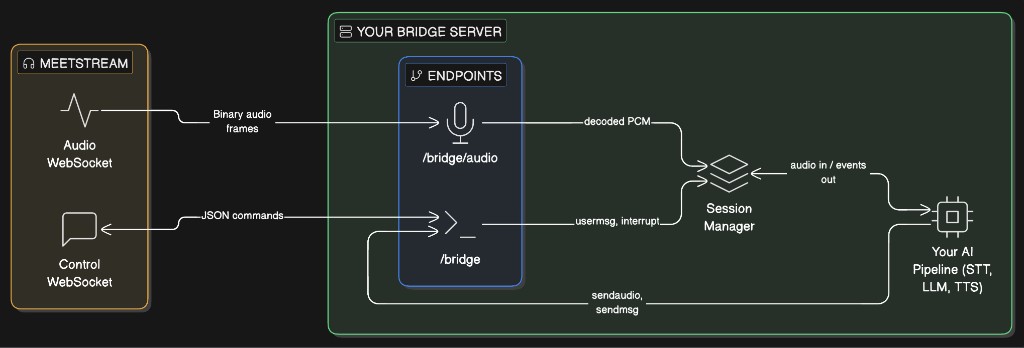
The bridge server exposes two WebSocket endpoints. Each MeetStream connection opens one to each:
Each MeetStream connection is identified by a bot_id. The session manager maintains one AI session per bot_id, created on first connection and torn down when both WebSockets disconnect.
Session Lifecycle
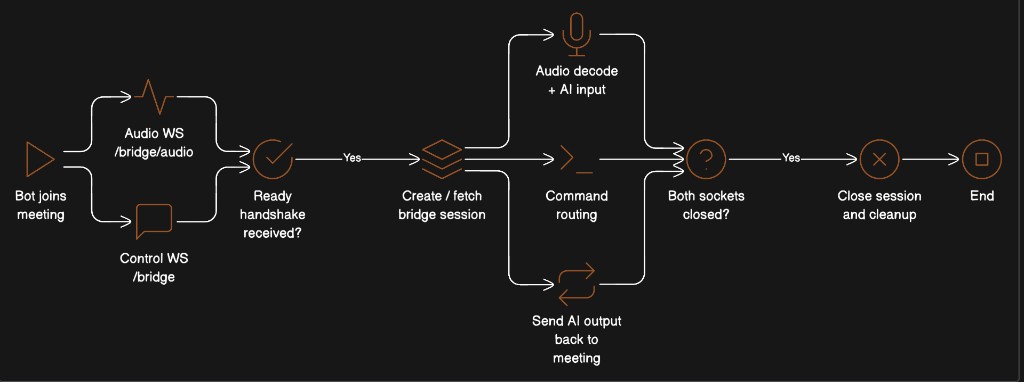
Key rules:
- Either channel can arrive first. The session is created on whichever connects first.
- Both channels share the same
bot_idand the same AI session. - Cleanup happens when both WebSockets have disconnected for a given
bot_id.
Core Components
1. Session Manager
The session manager is the central coordinator. It maps bot_id to:
- An AI session (your STT/LLM/TTS pipeline)
- References to the audio and control WebSockets
- Per-session locks to prevent race conditions during creation
2. Audio Decoder
Decodes the binary frame format from MeetStream. See Live Audio Capture & Frame Decoding for the full specification.
3. Audio Resampler
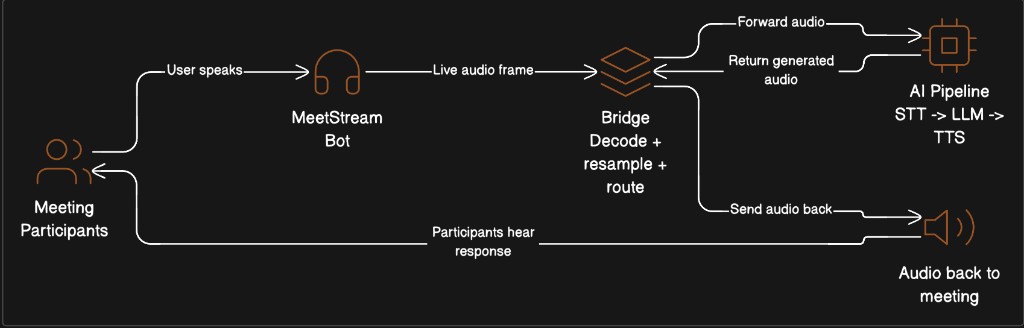
Meeting audio arrives at 48 kHz. Most AI models expect a different rate (e.g., 24 kHz for OpenAI Realtime, 16 kHz for Whisper). Resample before feeding your pipeline, and resample back to 48 kHz before sending to the meeting.
4. Speaker Filter
Filter out MeetStream’s own audio to prevent echo/feedback loops. The display name appears in the speaker_name field.
5. Command Sender
Helper functions to build outbound commands for the control channel. See Meeting Control & Command Patterns for the full command reference.
WebSocket Endpoints
Audio Endpoint: /bridge/audio
Receives binary audio frames from the meeting. Decodes speaker metadata, filters out MeetStream’s own audio, and routes PCM to your AI pipeline.
Control Endpoint: /bridge
Receives the MeetStream handshake and inbound commands (usermsg, interrupt). Your AI pipeline sends outbound commands (sendaudio, sendmsg, sendchat, interrupt) over this same connection.
Event Pump
The event pump is a background task that continuously reads output from your AI pipeline and forwards it to the meeting through the control WebSocket. This is the outbound half of the bridge.
Note: The event types above (
audio,audio_interrupted,text_response) are illustrative. Replace them with whatever events your AI framework emits.
Audio Flow Summary
Full Working Skeleton
A minimal but complete bridge server. Replace the YourAISession class with your actual AI pipeline.
Run:
Connecting MeetStream
When creating a MeetStream session, point both WebSocket URLs at your bridge server:
Both connections carry the same bot_id in their handshake, so the session manager can link them together.
Design Decisions
Why two separate WebSocket connections?
Separation of concerns. The audio channel is high-throughput binary data (hundreds of frames per minute). The control channel is low-frequency JSON commands. Splitting them avoids head-of-line blocking and makes it easier to handle each independently.
Why does the audio channel support both binary and JSON?
Backward compatibility. Older MeetStream versions send audio as JSON PCMChunk messages with base64-encoded audio. Current versions send binary frames (significantly more efficient). The bridge should accept both.
Why lock on session creation?
Both WebSocket connections race to ensure_session(). Without a lock, two AI sessions could be created for the same bot_id. The async lock ensures exactly one session is created.
Why clean up only when both connections close?
A single reconnecting WebSocket shouldn’t destroy the running session. The session stays alive as long as at least one channel is connected.
Why resample instead of sending at the model’s native rate?
MeetStream captures audio at 48 kHz (the standard WebAudio and Zoom SDK rate). Your model may need 16 kHz or 24 kHz. On the return path, MeetStream’s virtual speaker operates at 48 kHz. The bridge handles both conversions so neither MeetStream nor your model needs to know about the other’s sample rate.
Related Documentation
- Live Audio Capture & Frame Decoding — Binary frame format specification, decode examples in 4 languages, FAQ
- Meeting Control & Command Patterns — Full command reference for
sendaudio,sendmsg,sendchat,interrupt,sendimg,sendimg_url